reTraining AI Computer Vision Platform Logo # reTraining ### Take a base model you already have, and make it measurably better with footage you already have. **The Open-Source, Self-Hosted Vision Pipeline to Turn Raw Industrial CCTV into Production-Grade YOLO Object Detectors & Line Counters.**


Python 3.12 FastAPI React 19 Vite 7 SAM3 YOLO11 Docker CUDA License Documentation

Download Handover Docs PDF    Download 4K Diagram

[โšก Quickstart](#quickstart) ยท [๐Ÿ—๏ธ Architecture](#architecture) ยท [๐Ÿ–ผ๏ธ Visual UI Tour](#visual-tour) ยท [๐ŸŽฅ Counting Engine](#counting-engine) ยท [โš™๏ธ Configuration](#configuration) ยท [๐Ÿ“š Documentation](#documentation) ยท [๐Ÿ”ง Troubleshooting](#troubleshooting)
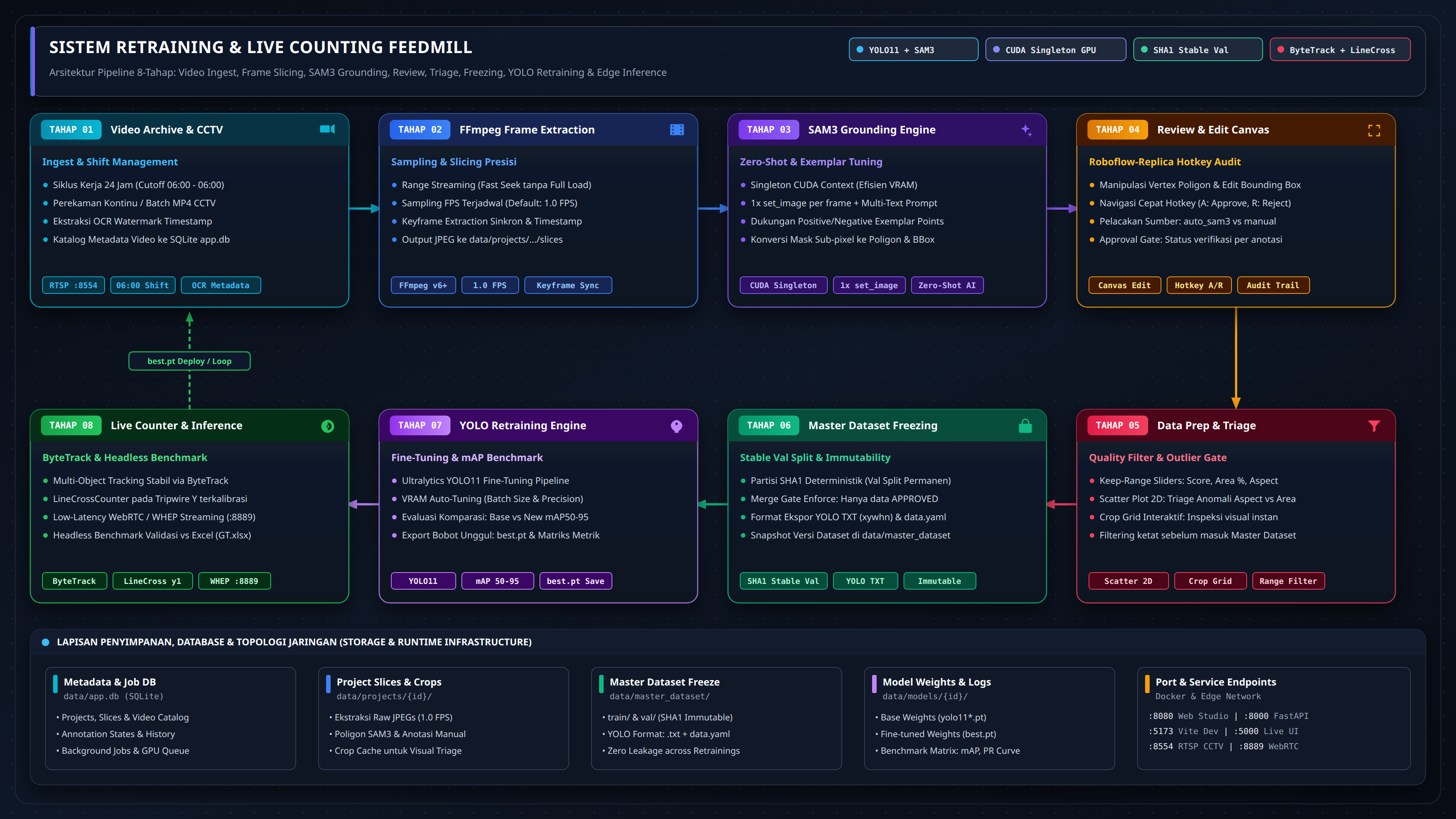
System Architecture & End-to-End Pipeline Diagram *Click diagram to view 4K UHD resolution. Scalable vector version available at [docs/diagram-alur.svg](docs/diagram-alur.svg).*
--- ## ๐Ÿ’ก Why reTraining? Deploying object detection models in industrial environments (manufacturing, logistics, agricultural feedmills, conveyor belts) often hits a painful bottleneck: **general base models fail on domain-specific edge cases, while building manual labeling pipelines from scratch is slow and expensive.** **reTraining** provides a self-contained, enterprise-grade active learning platform designed to run directly on your edge server or GPU workstation: 1. **Ingest Raw CCTV Footage**: Stream directly from continuous 24/7 video archives without re-encoding or modifying the underlying storage. 2. **Zero-Shot Foundation Auto-Labeling**: Leverage Meta's Segment Anything Model 3 (**SAM3**) with natural language text prompts and visual exemplars to annotate thousands of frames in minutes. 3. **Roboflow-Grade Review Studio**: Sub-second keyboard navigation, instant class switching, click-assist segmentation, and high-density visual triage crop grids. 4. **Statistical Triage & Data Prep**: Filter bounding box outliers by area, aspect ratio, and confidence score without discarding valid image frames. 5. **Immutable Dataset Freezing & Stable Val Splits**: Guarantee reproducible benchmarks with deterministic SHA-1 validation sets that never shift across retraining runs. 6. **Hardware-Aware Continuous Fine-Tuning**: Auto-detect host GPU VRAM, fine-tune Ultralytics YOLO11 models, and evaluate base vs. fine-tuned model performance side-by-side. 7. **Live Production Counting & Benchmarks**: Real-time RTSP/WHEP live inference with ByteTrack line-crossing counters, evaluated against verified ground truth physical counts at **146 FPS**. --- ## โšก Quickstart ### Prerequisites - **Host OS**: Linux (Ubuntu 22.04+ recommended) or Windows with WSL2. - **GPU Acceleration**: NVIDIA GPU with CUDA 12.4+ and [NVIDIA Container Toolkit](https://docs.nvidia.com/datacenter/cloud-native/container-toolkit/latest/install-guide.html) (Docker Engine 27+ CDI support). - **HuggingFace Account**: Gated model access granted for [facebook/sam3](https://huggingface.co/facebook/sam3) with a valid user access token (`HF_TOKEN`). - **Video Storage**: Directory of CCTV footage structured as `/.mp4` (or let the app mount `./data/archive`). --- ### Option 1: Docker Compose (Production Standard) Launch the entire stack with a single command. The startup script automatically inspects the host hardware, generates Container Device Interface (CDI) specs for your NVIDIA GPU, and starts both backend and frontend containers. ```bash # 1. Clone the repository git clone git@github.com:fhanyuh/reTraining.git cd reTraining # 2. Configure environment credentials cp .env.example .env # Edit .env and paste your HuggingFace user access token: # HF_TOKEN=hf_xxxxxxxxxxxxxxxxxxxxxxxxxxxxxxxxx # 3. Launch with automated GPU / CDI detection chmod +x start.sh ./start.sh ``` *Alternative direct Docker Compose launch:* ```bash docker compose up -d --build ``` **Access Points**: - ๐ŸŒ **Web Studio UI**: [http://localhost:9000](http://localhost:9000) - ๐Ÿ“‘ **Interactive REST API Docs**: [http://localhost:9010/docs](http://localhost:9010/docs) - ๐Ÿฉบ **Health & GPU Telemetry Endpoint**: [http://localhost:9010/api/health](http://localhost:9010/api/health) Verify system health and GPU VRAM availability: ```bash curl http://localhost:9010/api/health ``` ```json { "device": "cuda", "gpu": "NVIDIA GeForce RTX 5080 Laptop GPU", "vram_free_gb": 14.91, "sam3_ready": true, "ffmpeg": true, "hf_token": true, "db": true } ``` > [!IMPORTANT] > The initial SAM3 auto-annotation job automatically downloads the **~3.4 GB SAM3 checkpoint** from HuggingFace into a persistent Docker named volume (`hf-cache`). Subsequent executions load the model into VRAM in ~12 seconds. --- ### Option 2: Local Development (Bare-Metal / uv + Vite) For core development and live debugging without Docker: **Requirements**: Python 3.12+, Astral [`uv`](https://docs.astral.sh/uv/), Node.js 20+, FFmpeg. ```bash # 1. Clone and setup environment git clone git@github.com:fhanyuh/reTraining.git cd reTraining cp .env.example .env # 2. Install backend dependencies and vendored SAM3 with uv uv pip install -r requirements.txt uv pip install -e ./sam3 # 3. Start FastAPI backend (Port 8000) uv run uvicorn backend.main:app --host 0.0.0.0 --port 8000 --reload # 4. In a separate terminal, install and start Vite frontend (Port 5173) cd frontend npm install npm run dev -- --host 0.0.0.0 --port 5173 ``` > [!NOTE] > The frontend dependencies are pinned to **Vite 7** (`vite: ^7.1.5`) in `frontend/package.json` to prevent Rolldown native binding bus errors on Linux platforms. --- ## ๐Ÿ—๏ธ End-to-End Pipeline Architecture The platform operates as a continuous closed-loop retraining pipeline divided into 7 distinct functional stages: ``` โ”Œโ”€โ”€โ”€โ”€โ”€โ”€โ”€โ”€โ”€โ”€โ”€โ”€โ”€โ”€โ”€โ”€โ”€โ”€โ”€โ”€โ”€โ”€โ”€โ”€โ”€โ”€โ”€โ”€โ”€โ”€โ”€โ”€โ”€โ”€โ”€โ”€โ”€โ”€โ”€โ”€โ”€โ”€โ”€โ”€โ”€โ”€โ”€โ”€โ”€โ”€โ”€โ”€โ”€โ”€โ”€โ”€โ”€โ”€โ”€โ”€โ”€โ”€โ”€โ”€โ”€โ”€โ”€โ”€โ”€โ”€โ”€โ”€โ”€โ”€โ”€โ”€โ”€โ”€โ”€โ”€โ”€โ”€โ”€โ”€โ”€โ”€โ”€โ”€โ”€โ”€โ”€โ”€โ”€โ”€โ”€โ”€โ”€โ”€โ” โ”‚ DATA RETRAINING & INFERENCE PIPELINE โ”‚ โ””โ”€โ”€โ”€โ”€โ”€โ”€โ”€โ”€โ”€โ”€โ”€โ”€โ”€โ”€โ”€โ”€โ”€โ”€โ”€โ”€โ”€โ”€โ”€โ”€โ”€โ”€โ”€โ”€โ”€โ”€โ”€โ”€โ”€โ”€โ”€โ”€โ”€โ”€โ”€โ”€โ”€โ”€โ”€โ”€โ”€โ”€โ”€โ”€โ”€โ”€โ”€โ”€โ”€โ”€โ”€โ”€โ”€โ”€โ”€โ”€โ”€โ”€โ”€โ”€โ”€โ”€โ”€โ”€โ”€โ”€โ”€โ”€โ”€โ”€โ”€โ”€โ”€โ”€โ”€โ”€โ”€โ”€โ”€โ”€โ”€โ”€โ”€โ”€โ”€โ”€โ”€โ”€โ”€โ”€โ”€โ”€โ”€โ”€โ”˜ [1. Video Archive] โ”€โ”€โ–ถ [2. Frame Slicing] โ”€โ”€โ–ถ [3. SAM3 Auto-Label] โ”€โ”€โ–ถ [4. Review & Exemplar] (CCTV/MP4) (FFmpeg In/Out) (Prompt Grounding) (Click-Assist Canvas) โ”‚ [7. Live Counter] โ—€โ”€โ”€ [6. YOLO11 Train] โ—€โ”€โ”€ [5. Immutable Split] โ—€โ”€โ”€ [4. Triage & Filter] (WHEP / RTSP) (Auto VRAM) (Stable Train/Val) (Outlier Purge) ``` 1. **Video Archive & Shift Slicing**: Raw CCTV recordings are indexed into 24-hour operational work shifts (06:00 to 05:59 next morning). Sub-second timeline in/out trimming extracts high-resolution frame sequences with configurable FPS rates via asynchronous FFmpeg queues. 2. **SAM3 Foundation Auto-Labeling**: Meta SAM3 zero-shot open-vocabulary grounding generates candidate bounding boxes and segmentation masks from natural language descriptions (e.g. `"white sack of feed on conveyor"`). 3. **Interactive Review Studio**: Operators review candidate annotations on a Roboflow-grade canvas with single-keystroke approvals, box adjustments, click-assist segmentation, and visual prompt exemplar refinement. 4. **Statistical Triage & Quality Outliers**: Interactive 2D scatter plots (Box Area vs. Confidence Score) and high-density crop grids allow rapid isolation and pruning of false positives without discarding valid frames. 5. **Immutable Dataset Compilation**: Filtered batches are merged into versioned datasets (`v1`, `v2`, `v3`) with deterministic SHA-1 validation hashing, guaranteeing that validation images remain permanently locked across iterations. 6. **Hardware-Aware YOLO Retraining**: Hyperparameters and batch sizes auto-scale based on detected GPU VRAM. The system fine-tunes Ultralytics YOLO11, benchmarks old vs. new models on the identical validation set, and displays signed metric deltas ($\Delta\text{mAP50}$, $\Delta\text{Precision}$, $\Delta\text{Recall}$). 7. **Counting Accuracy Benchmark & Live Inference**: Real-time production inference evaluates live RTSP/WHEP video streams with ByteTrack trajectory tracking and upper-edge tripwire counters, benchmarking against hand-verified physical ground truth logs at **146 FPS**. --- ## ๐Ÿ–ผ๏ธ Visual UI Tour & Feature Gallery Explore the 6 core pipeline phases across all 11 primary user screens and modal workflows. --- ### Phase 1: Video Ingest, Shift Cycles & Frame Sampling
1.1 Project Workspace & Setup โ€” Multi-project isolation and class locking
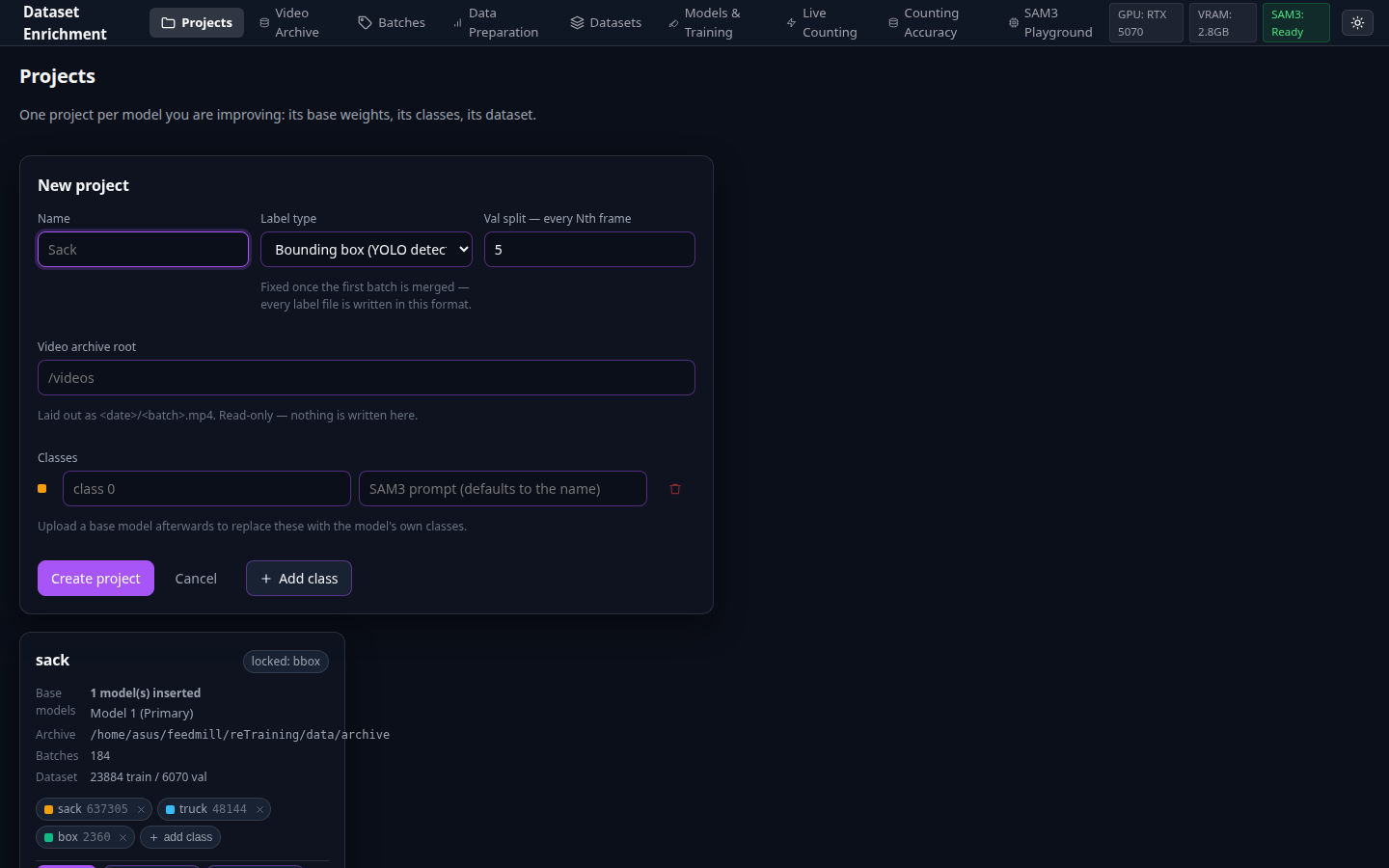
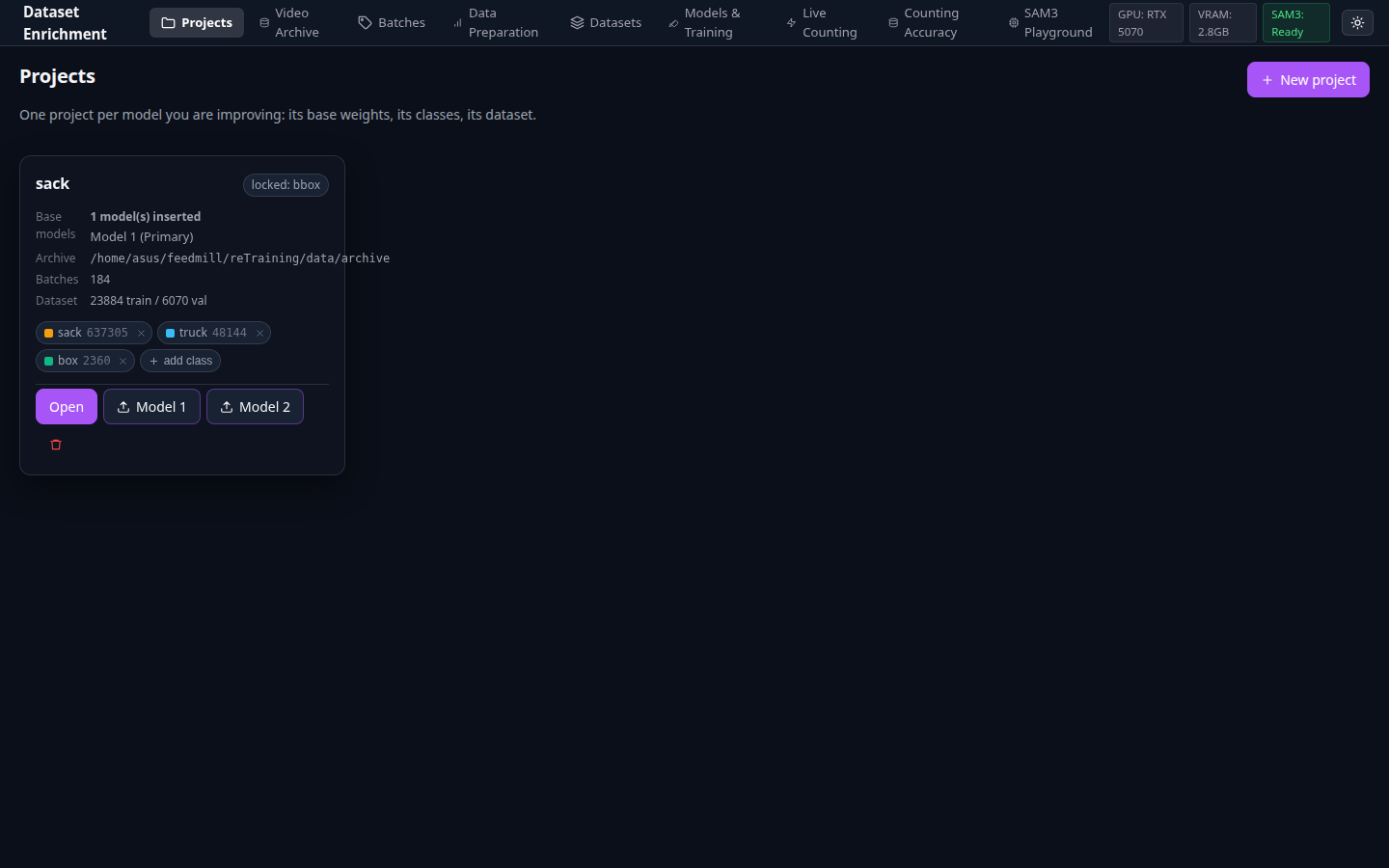
Projects Overview Page

Figure 1.1: Projects Dashboard showing active projects, base models, class taxonomies, and dataset stats.

| Attribute | Specification | |---|---| | **๐ŸŽฏ Purpose** | Central management hub for all isolated computer vision projects. | | **โšก Key Capabilities** | View base model architecture, active class tags, total extracted batches, and dataset snapshots at a glance. | | **๐Ÿ’ก Invariant** | Projects maintain strictly isolated database records, class lists, and filesystem storage roots under `data/projects//`. |
Project Creation Modal

Figure 1.2: Project Creation dialog with base model checkpoint upload and automatic class extraction.

| Attribute | Specification | |---|---| | **๐ŸŽฏ Purpose** | Initialize a new project with locked class names and base model weights. | | **โšก Key Capabilities** | Upload an existing YOLO `.pt` checkpoint to automatically extract its class taxonomy, or define custom classes and start fine-tuning from `yolo11n.pt`. | | **๐Ÿ’ก Invariant** | Base model classes are permanently locked to the project to prevent label drift between training iterations. |
1.2 24-Hour Operational Shift Archive โ€” Cycle grouping that crosses midnight
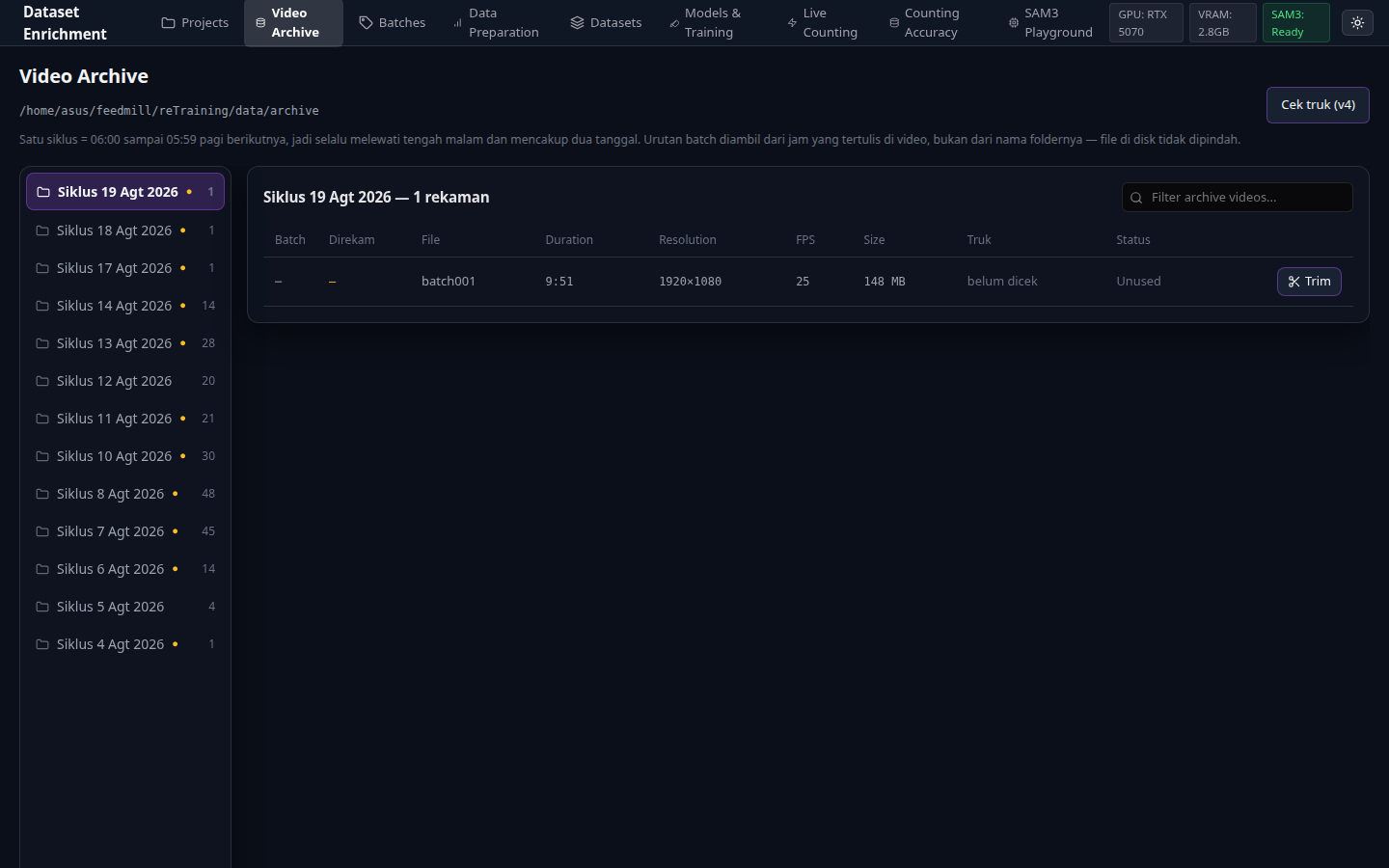
Video Archive Shift Cycle Browser

Figure 1.3: Video Archive grouping recordings into 24-hour operational shifts (06:00 to 05:59 next morning).

| Attribute | Specification | |---|---| | **๐ŸŽฏ Purpose** | Browse raw CCTV recordings grouped by operational work shifts rather than arbitrary calendar folders. | | **โšก Key Capabilities** | Reads camera burned-in OCR timestamps and sidecar `.json` metadata to assign recordings accurately across midnight boundaries. | | **๐Ÿ’ก Invariant** | The video archive is mounted **strictly read-only** (`:ro`). Nothing is ever modified, renamed, or deleted in the user's video repository. |
1.3 Video Trim & Frame Extractor โ€” Sub-second timeline scrubbing and sampling
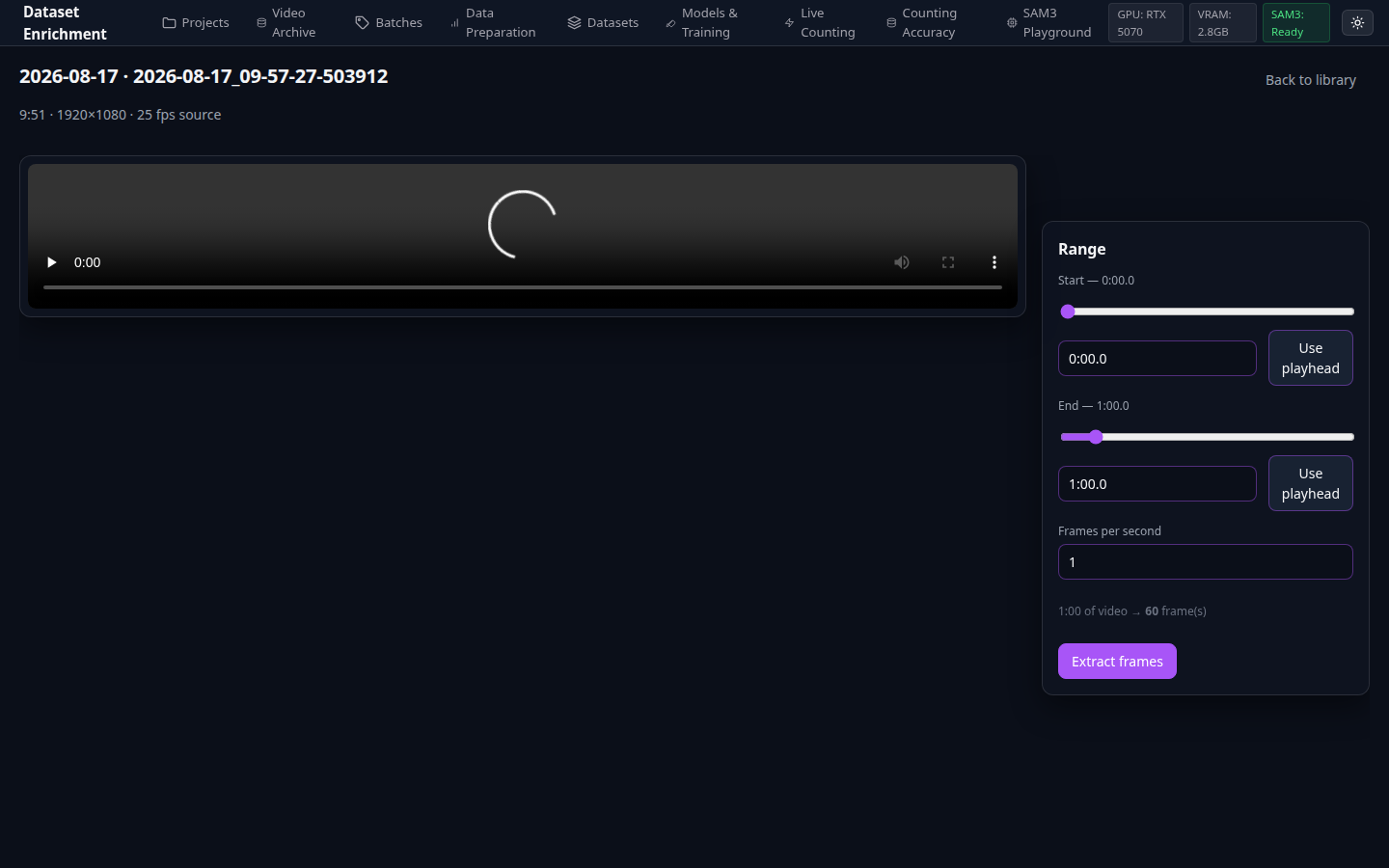
Video Trim and Frame Extractor

Figure 1.4: Video Trim interface with timeline range sliders and real-time frame calculation.

| Attribute | Specification | |---|---| | **๐ŸŽฏ Purpose** | Select active truck loading ranges and configure extraction frame rates. | | **โšก Key Capabilities** | Interactive in/out timeline markers, extraction FPS slider (0.5 โ€“ 2.0 FPS), real-time output frame counter, and background FFmpeg queueing. | | **๐Ÿ’ก Invariant** | Extraction runs asynchronously in the background queue; frames are losslessly sampled into `data/projects//batches//frames/`. |
--- ### Phase 2: SAM3 Zero-Shot Auto-Labeling Engine
2.1 Batch Management & Mass Auto-Annotation โ€” High-throughput zero-shot grounding
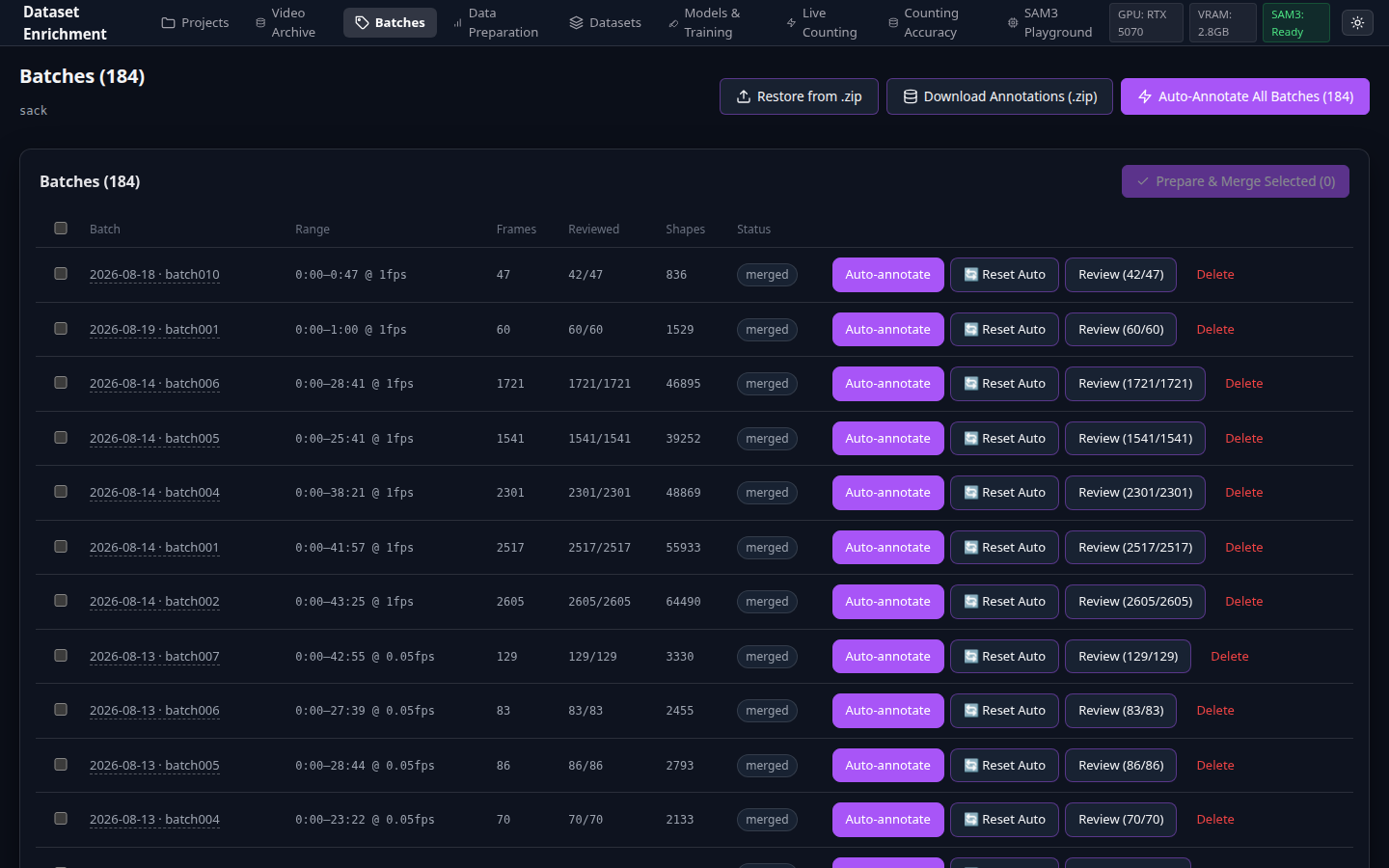
Batch Management Dashboard

Figure 2.1: Batch Management table with batch status badges and bulk action triggers.


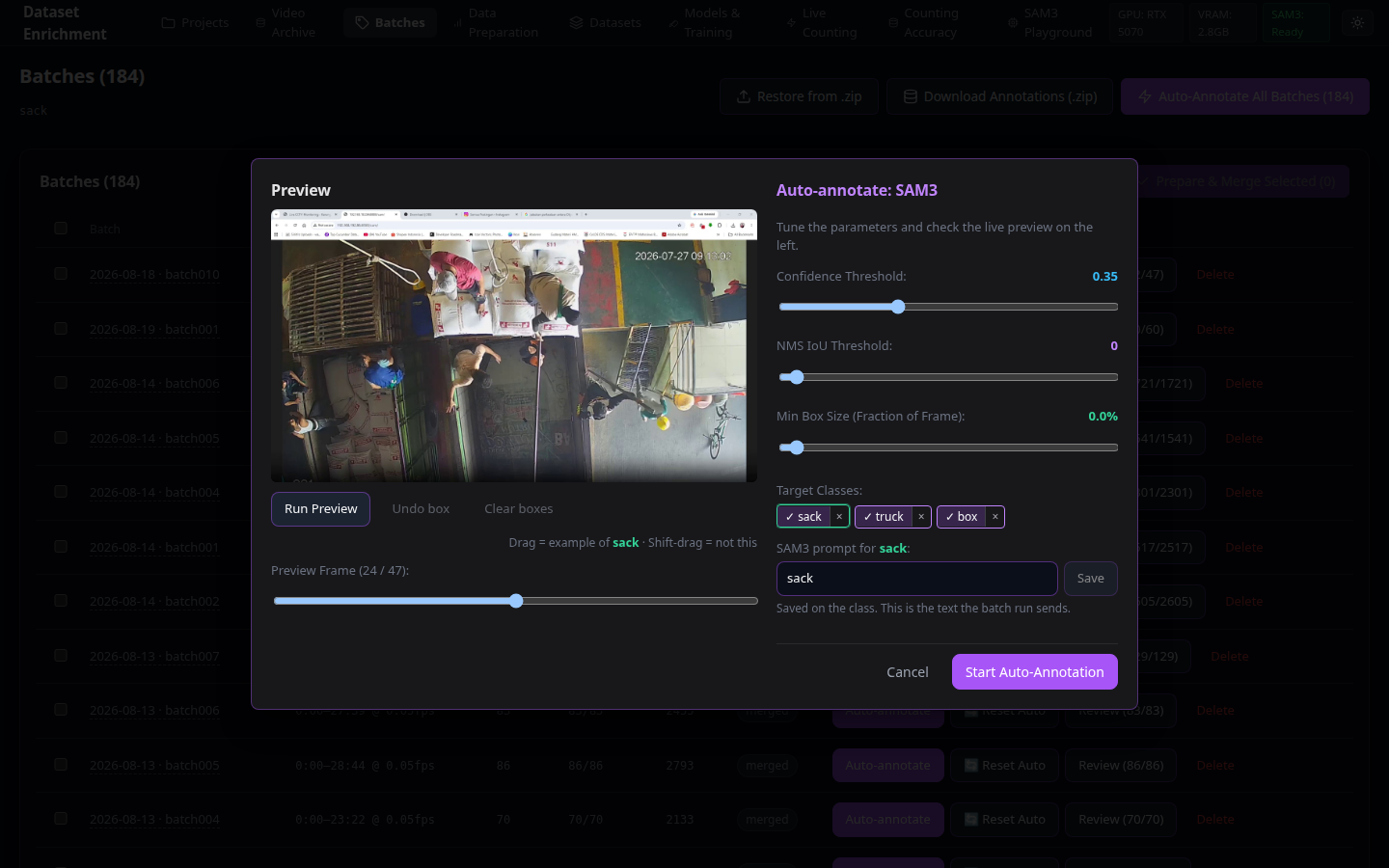
Single Batch SAM3 Auto-Annotate Modal

Figure 2.2: Single-batch SAM3 auto-annotation configuration with natural language text prompts.


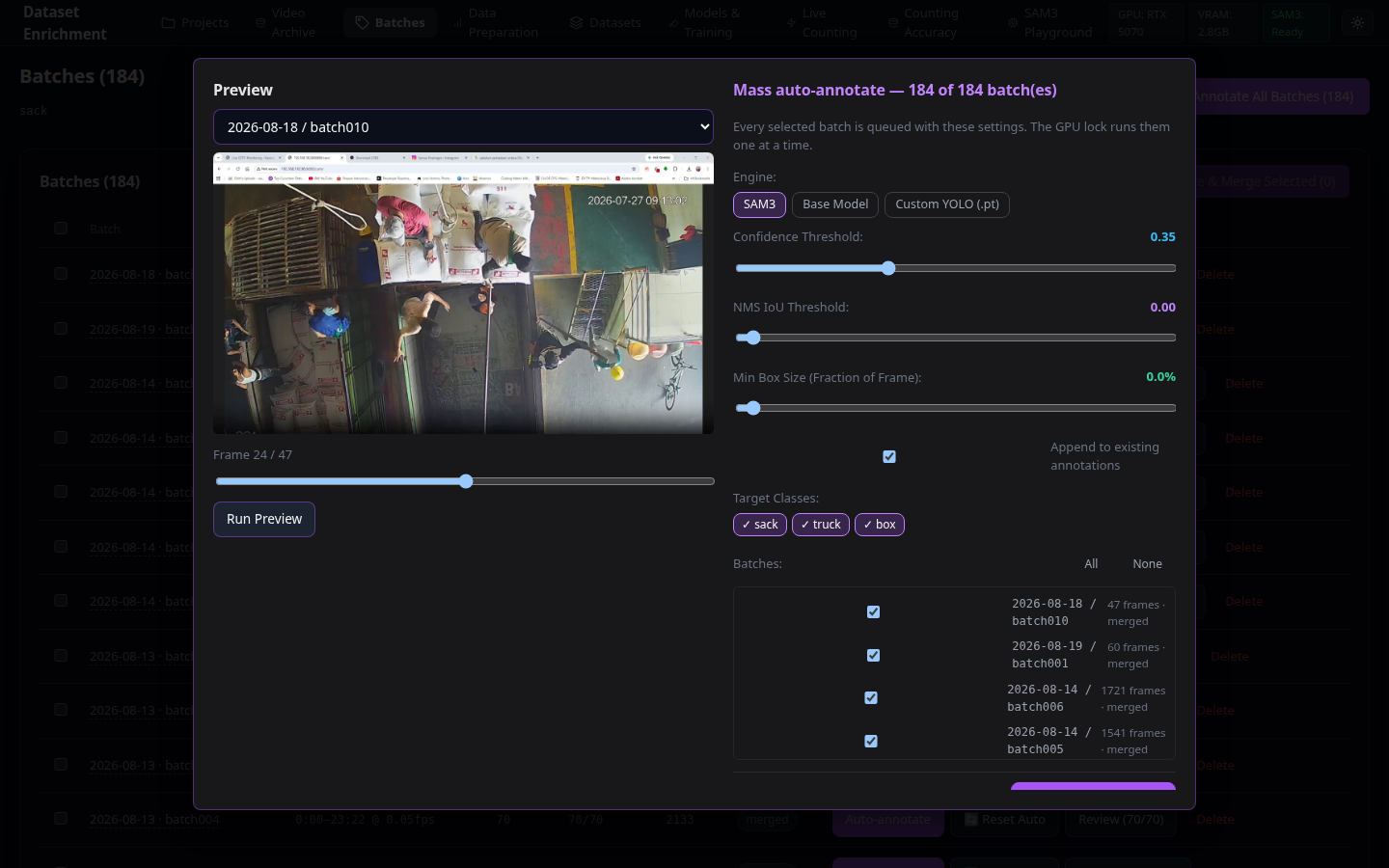
Mass Auto-Annotate Modal

Figure 2.3: Mass Auto-Annotate dialog for enqueuing thousands of frames across multiple batches.

| Attribute | Specification | |---|---| | **๐ŸŽฏ Purpose** | Orchestrate Segment Anything Model 3 (SAM3) text-prompted auto-annotation across single or bulk batches. | | **โšก Key Capabilities** | Multi-prompt zero-shot grounding, adjustable confidence thresholds, box expansion margin, and background job queueing with VRAM singleton management. | | **๐Ÿ’ก Invariant** | **One `set_image` per frame**: SAM3 runs its heavy vision backbone once per image and re-runs only the lightweight grounding head across multiple prompts, ensuring maximum inference throughput. |
2.2 SAM3 Interactive Sandbox โ€” Standalone prompt engineering playground
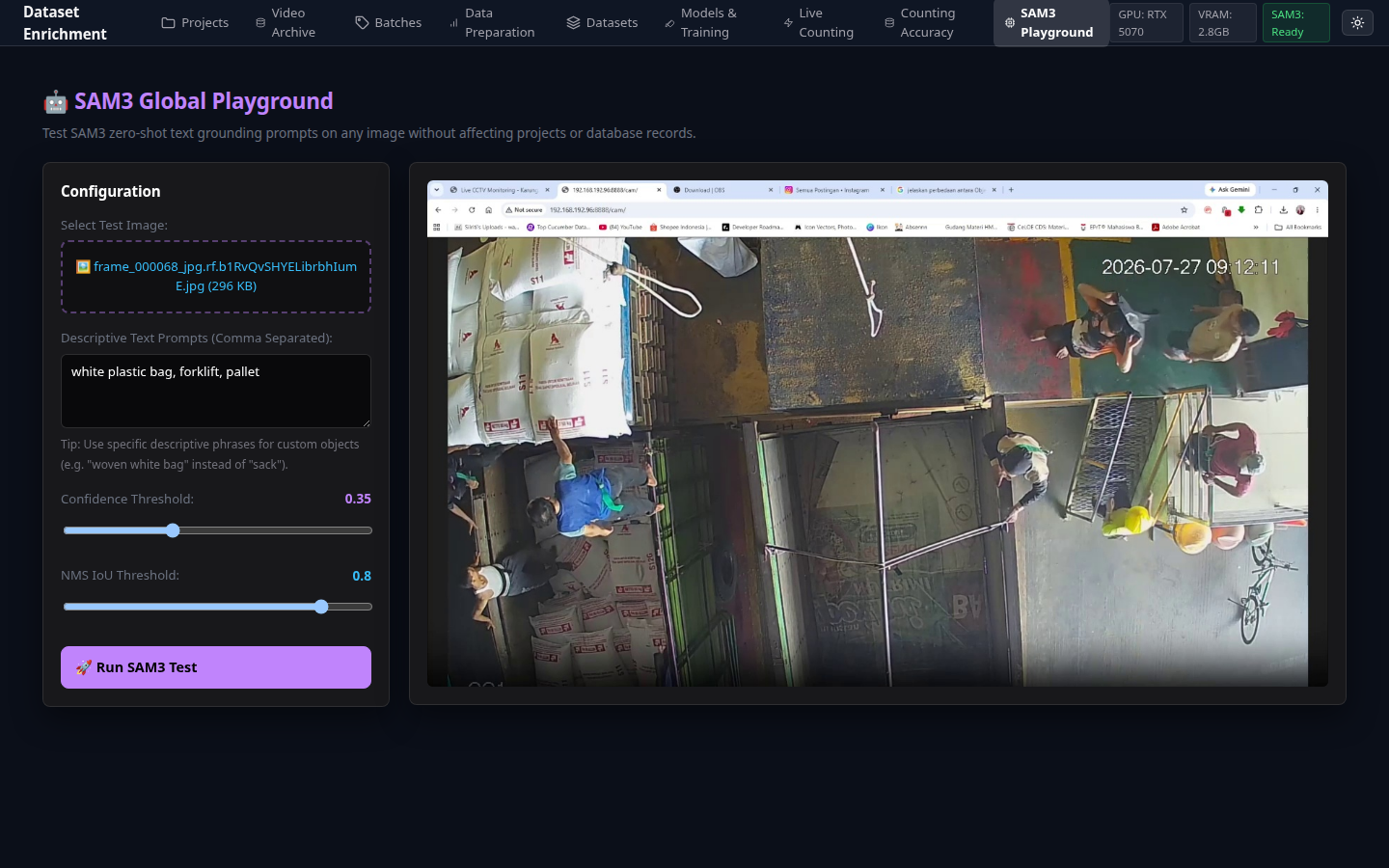
SAM3 Interactive Playground

Figure 2.4: SAM3 Interactive Playground for zero-shot text prompting and point prompt testing.

| Attribute | Specification | |---|---| | **๐ŸŽฏ Purpose** | Interactive sandbox for testing text prompts, positive/negative point clicks, and mask segmentation before launching large auto-annotation jobs. | | **โšก Key Capabilities** | Real-time mask rendering, multi-prompt layer toggles, point click prompt refinement, and raw JSON detection inspector. |
--- ### Phase 3: High-Throughput Annotation Studio & Triage
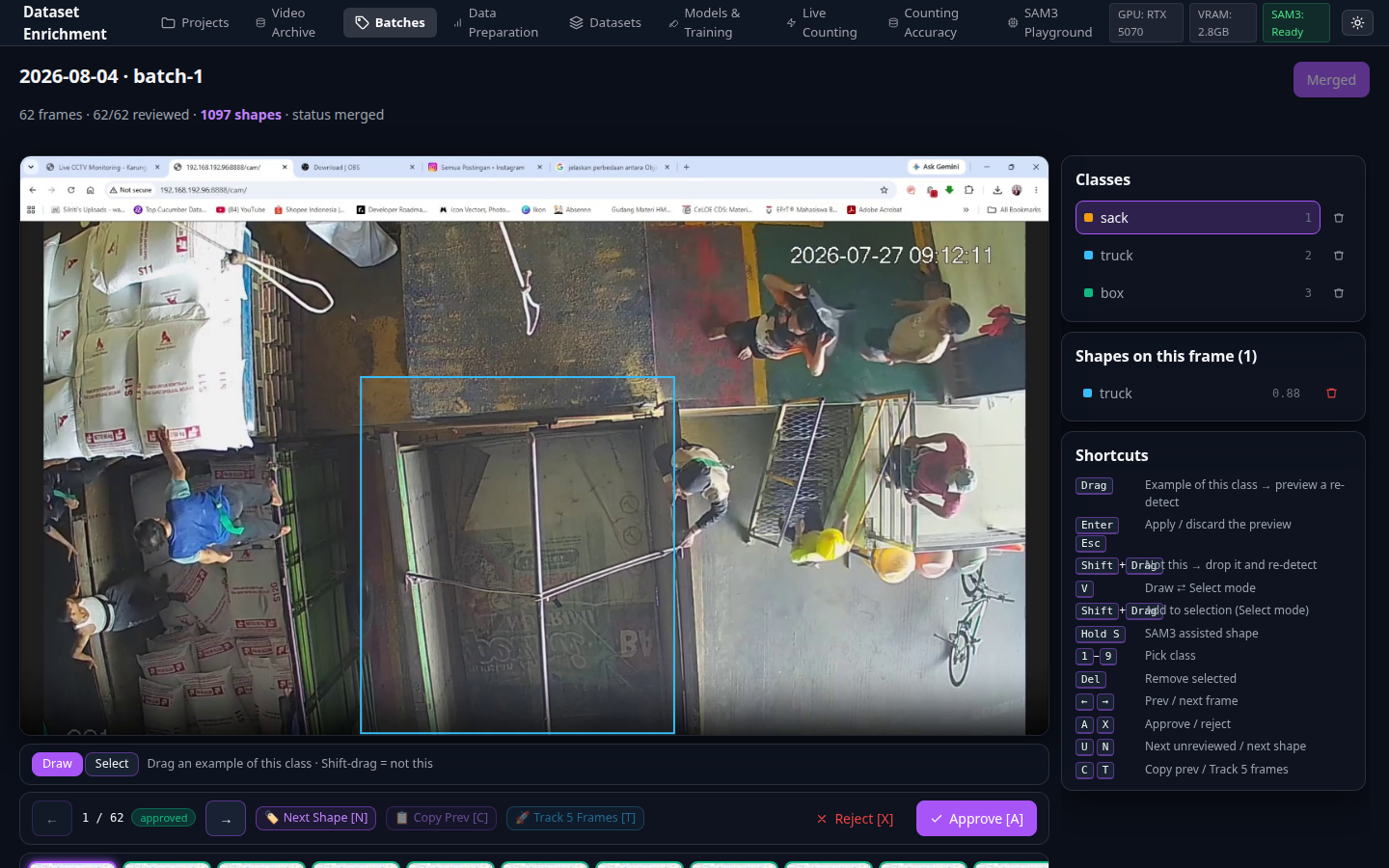
3.1 Roboflow-Grade Annotation Canvas & Quick Reclass โ€” Sub-second keyboard navigation
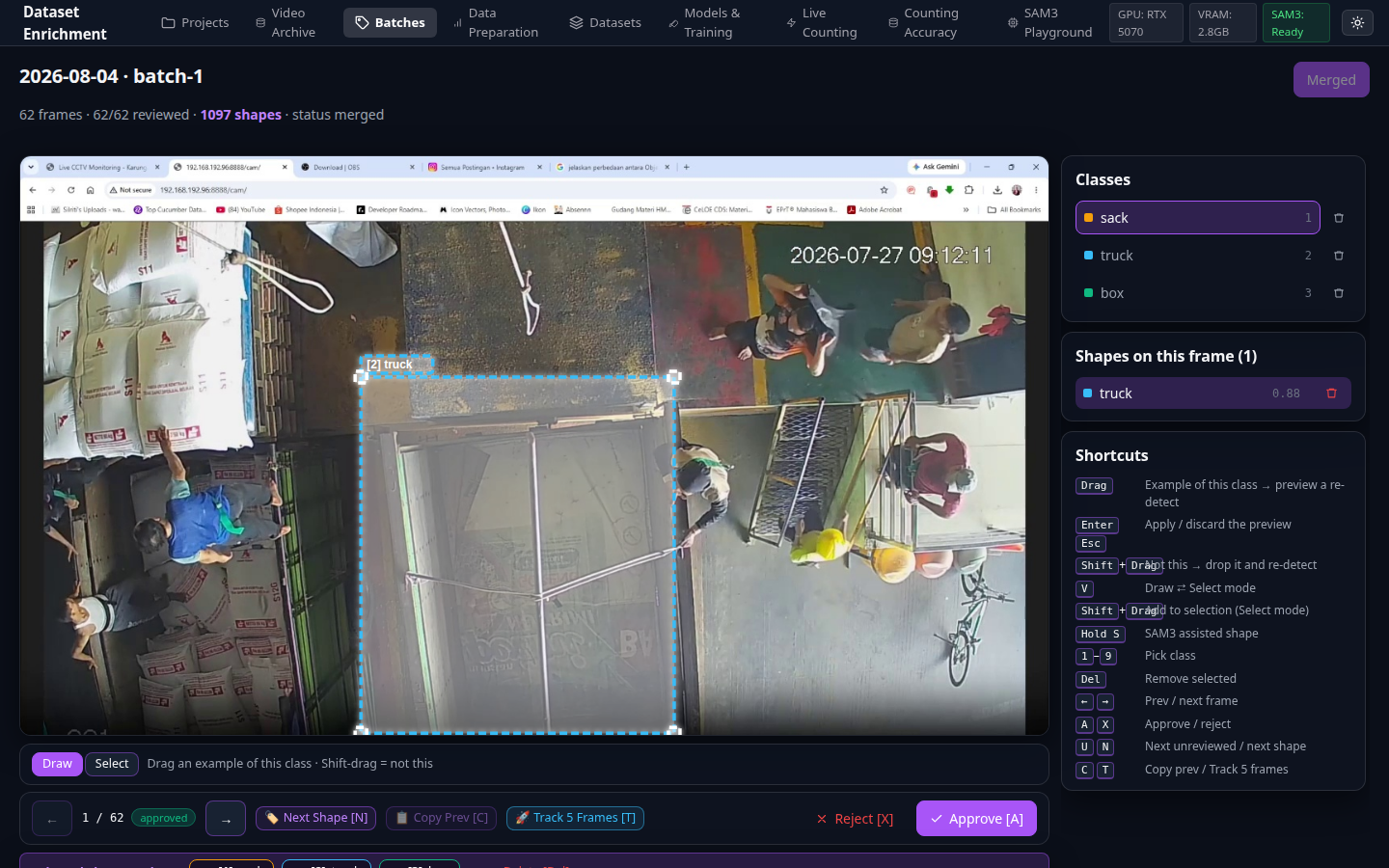
Annotation Review Canvas

Figure 3.1: Annotation Review Canvas with bounding box editor, shape provenance badges, and hotkey controls.


Review Filmstrip and Quick Reclass Bar

Figure 3.2: Filmstrip thumbnail navigation and floating single-keystroke quick reclassification bar.

| Key | Action | | Key | Action | |---|---|---|---|---| | `A` | Approve frame | | `โ†` `โ†’` | Previous / next frame | | `X` | Reject frame | | `U` | Jump to next unreviewed | | `Del` | Delete selected shape | | `1`โ€“`9` | Quick switch active class | | `S` + Drag | SAM3-assisted box click | | Drag | Add / move / resize bounding box | | Attribute | Specification | |---|---| | **๐ŸŽฏ Purpose** | Fast, ergonomic manual review and refinement of auto-generated bounding boxes. | | **โšก Key Capabilities** | Single-key shortcuts, bottom thumbnail filmstrip with status indicators, and shape provenance tracking (`SAM3`, `Manual`, `Base Model`). | | **๐Ÿ’ก Invariant** | Approving frames does **not** merge them into a dataset. Approval merely qualifies frames for Data Prep; merging happens under frozen rules. |
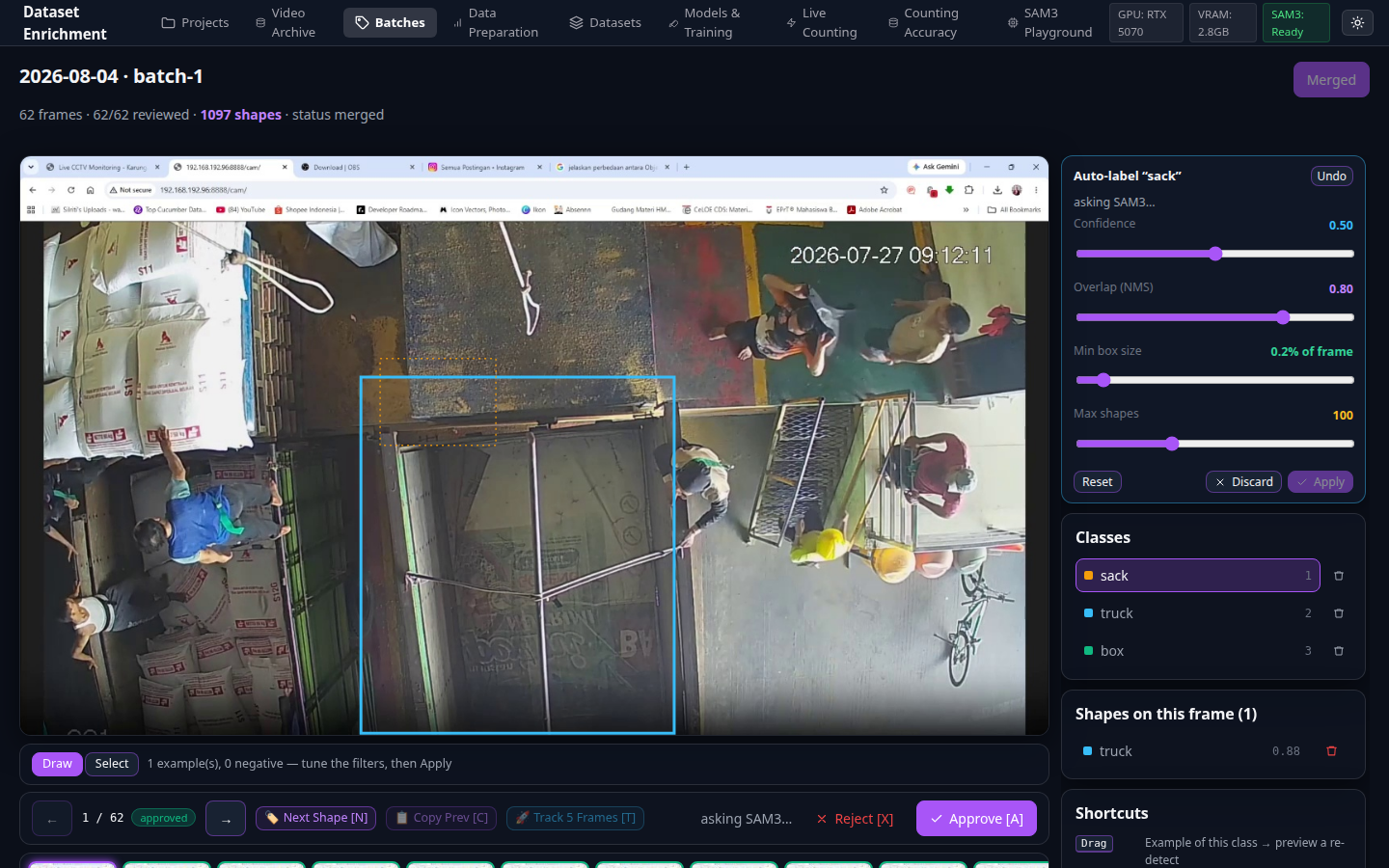
3.2 Visual Exemplar-Guided Prompting โ€” Few-shot visual reference matching
Exemplar Pool Panel

Figure 3.3: Exemplar Pool Sidebar Panel for visual reference matching.

| Attribute | Specification | |---|---| | **๐ŸŽฏ Purpose** | Store and utilize positive and negative visual crop exemplars to guide SAM3 zero-shot grounding on difficult textures or ambiguous sack designs. | | **โšก Key Capabilities** | Visual exemplar library, similarity threshold slider, 1-click exemplar addition from canvas bounding boxes. |
--- ### Phase 4: Data Prep, Statistical Triage & Dataset Freezing
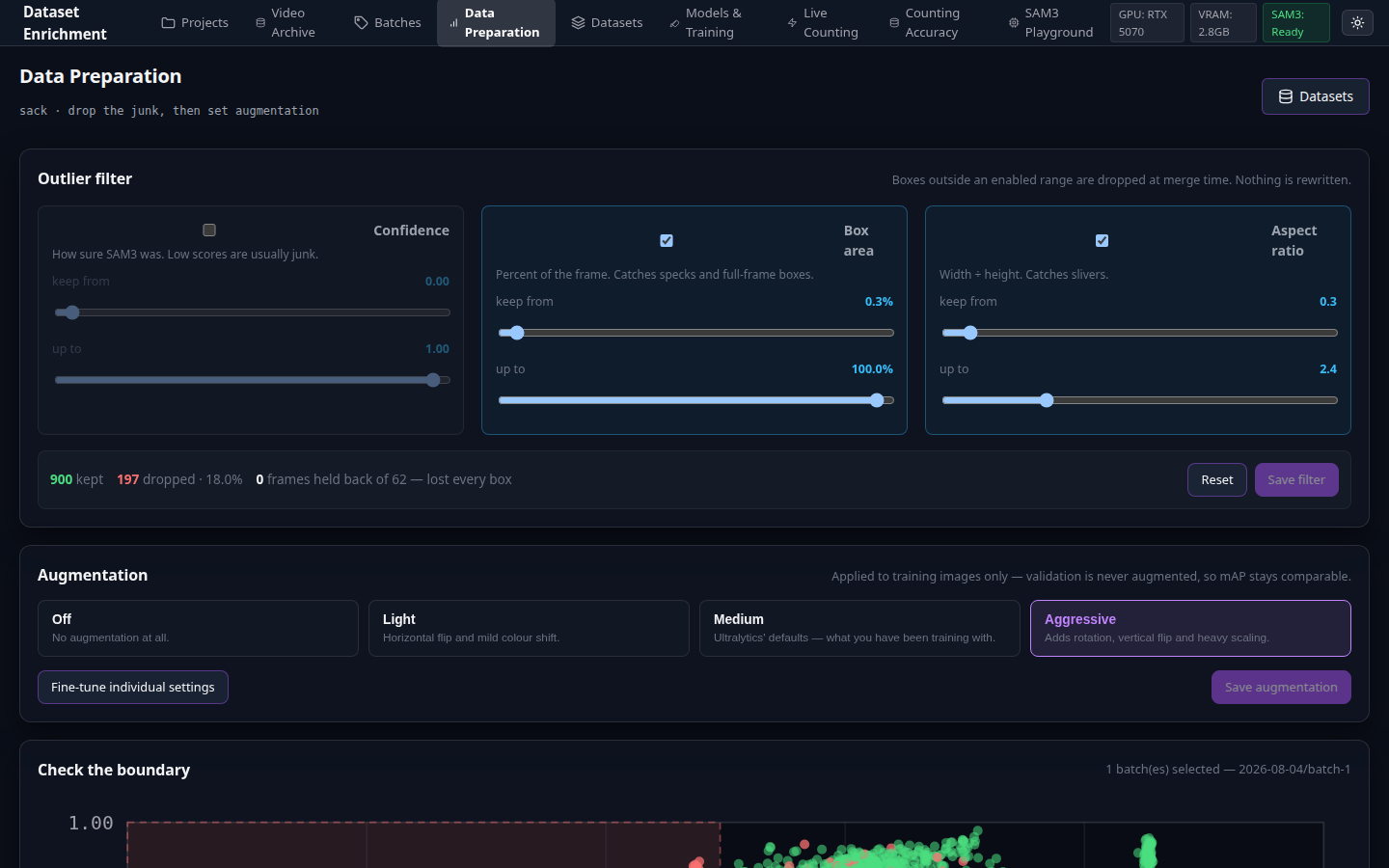
4.1 Statistical Triage & Quality Outlier Filtering โ€” Filter bad boxes without losing full images
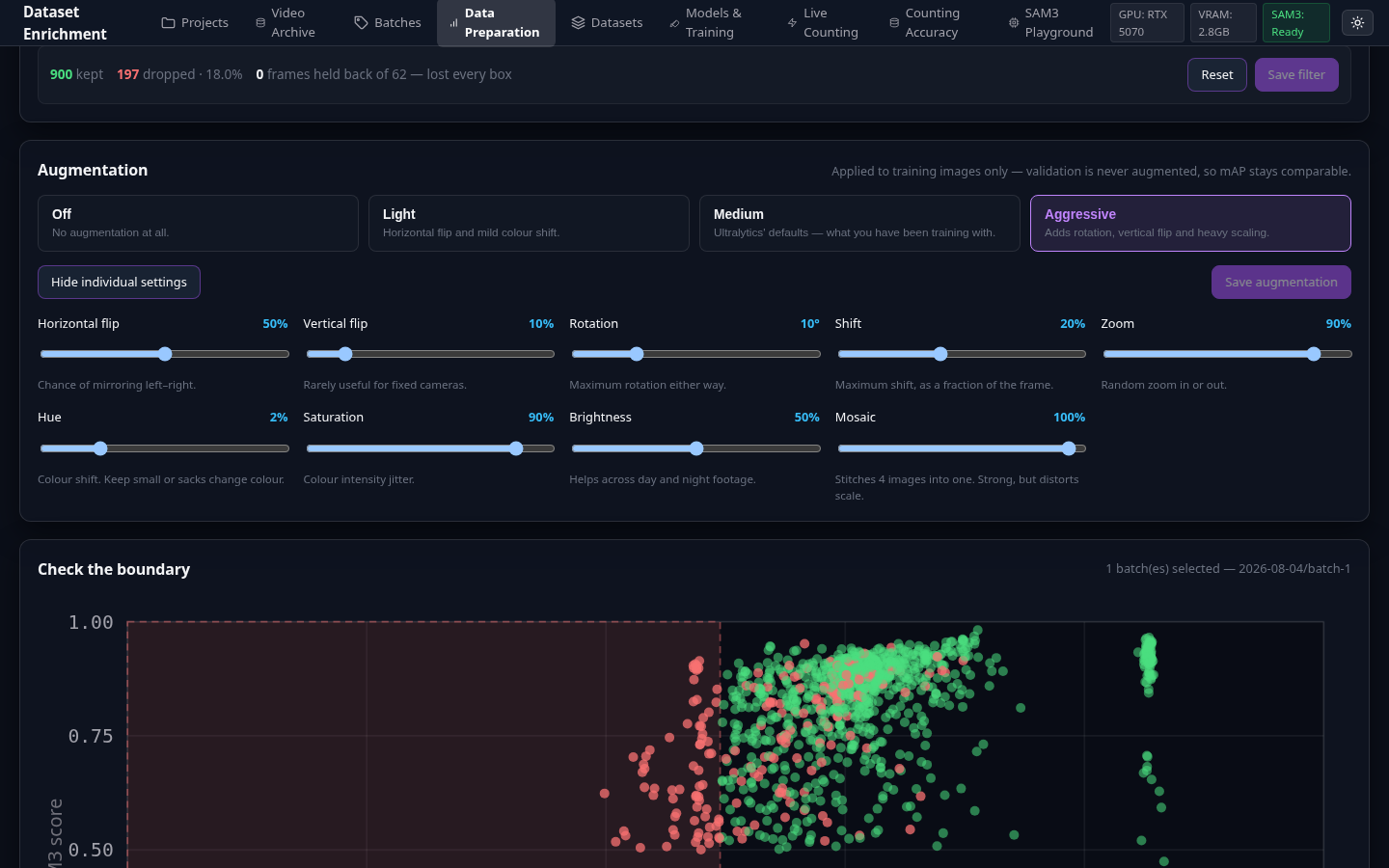
Data Prep Quality Outliers Panel

Figure 4.1: Quality filter sliders with live box and frame retention counters.


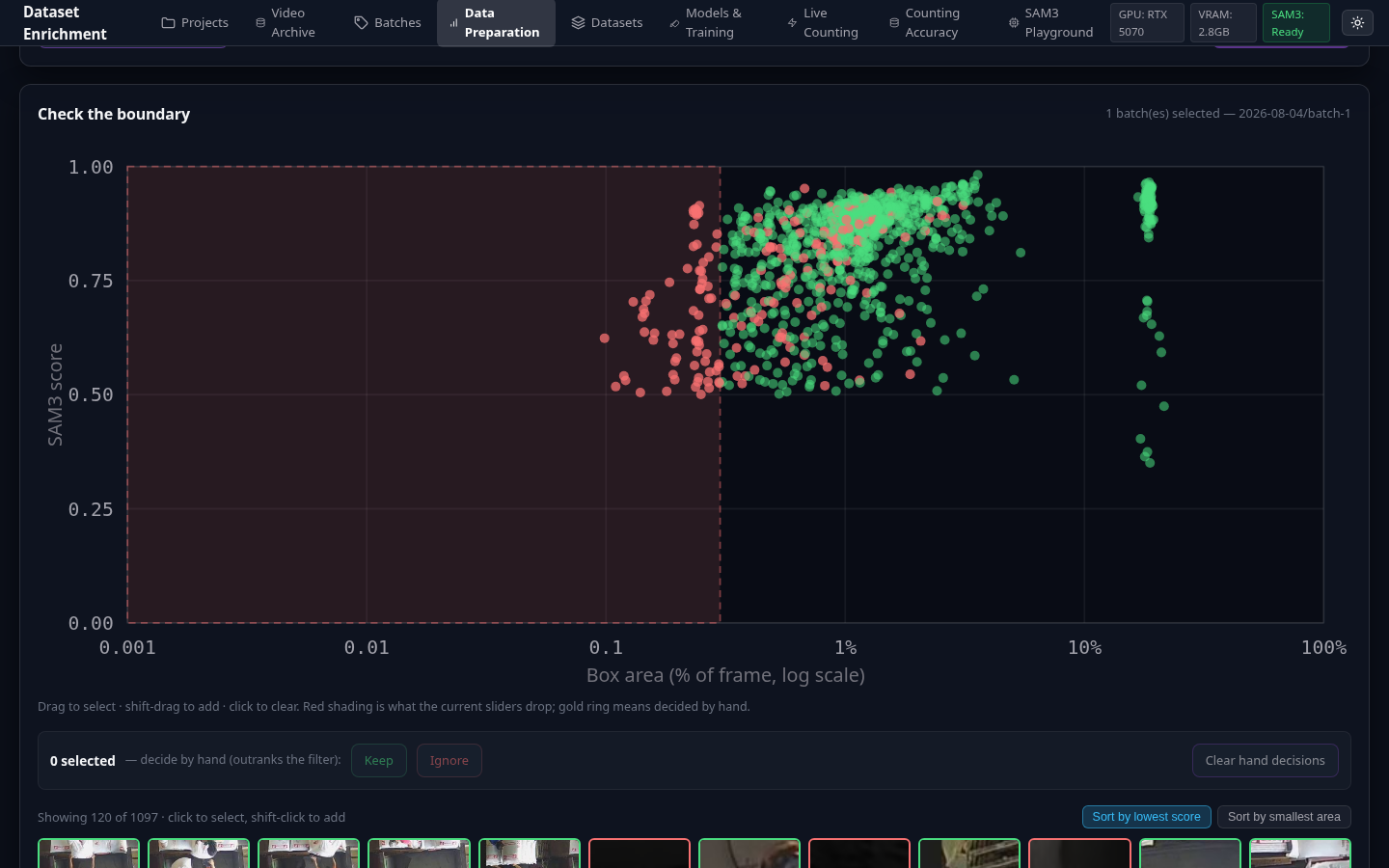
Triage Scatter Plot

Figure 4.2: Interactive Scatter Plot (Score vs Area) for instant visual outlier cluster detection.


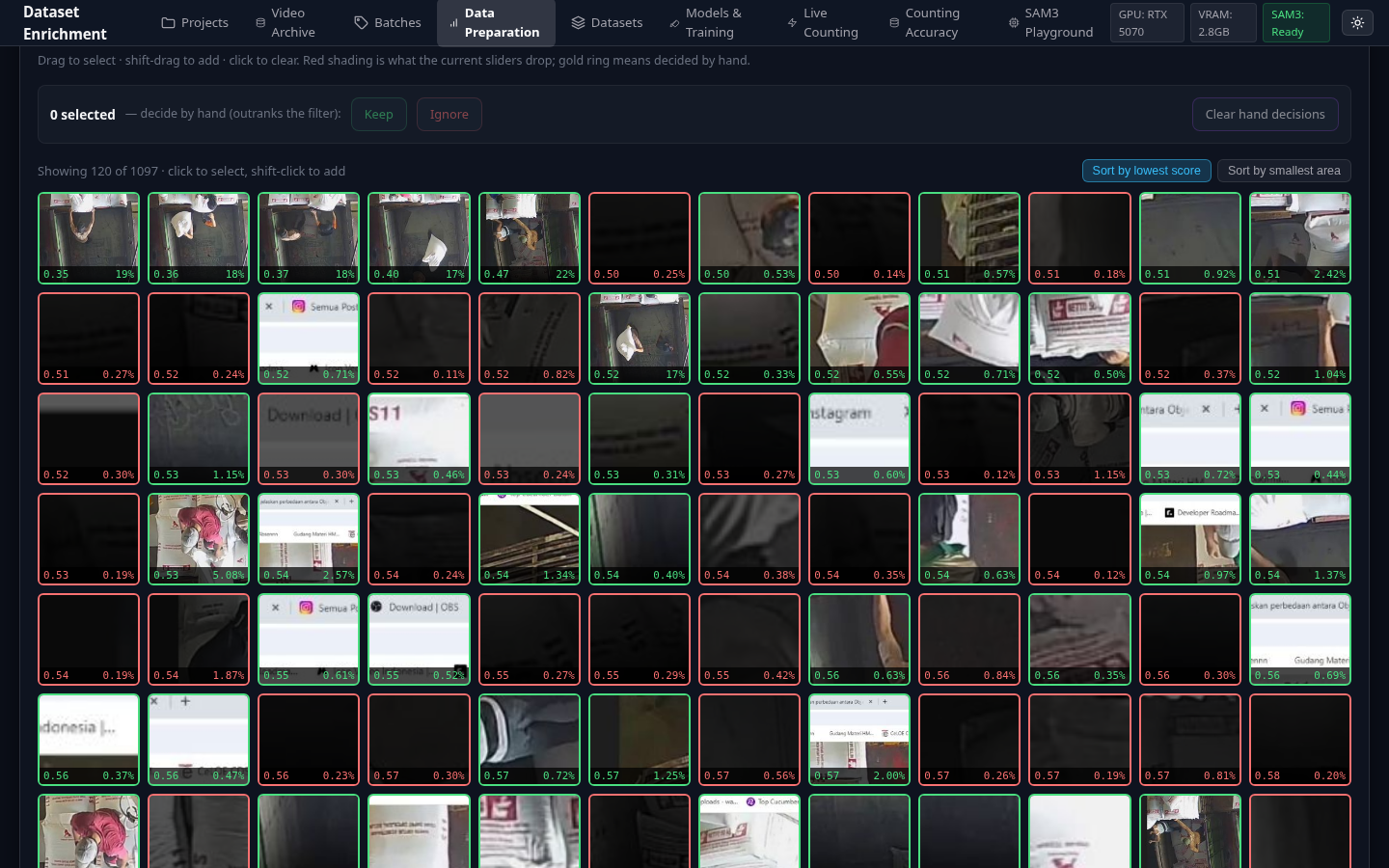
Triage Crop Grid

Figure 4.3: Triage Crop Grid for rapid bulk visual inspection and 1-click outlier removal.

| Attribute | Specification | |---|---| | **๐ŸŽฏ Purpose** | Eliminate low-quality bounding boxes (partial crops, false positives, background noise) before dataset compilation. | | **โšก Key Capabilities** | Dual-handle range sliders (Confidence Score, Box Area, Aspect Ratio), interactive SVG scatter plot, high-density crop grid cards, and real-time retention telemetry. | | **๐Ÿ’ก Invariant** | Dropping an outlier bounding box **leaves the frame in the dataset** unless all boxes are dropped. Industrial conveyor frames contain ~44 objects; dropping whole frames discards 96% of good data to remove 10% of bad boxes. |
4.2 Augmentation Pipeline & Dataset Freezing โ€” Deterministic Stable Val Split
Augmentation Configuration Panel

Figure 4.4: Albumentations training augmentation presets with real-time visual preview.


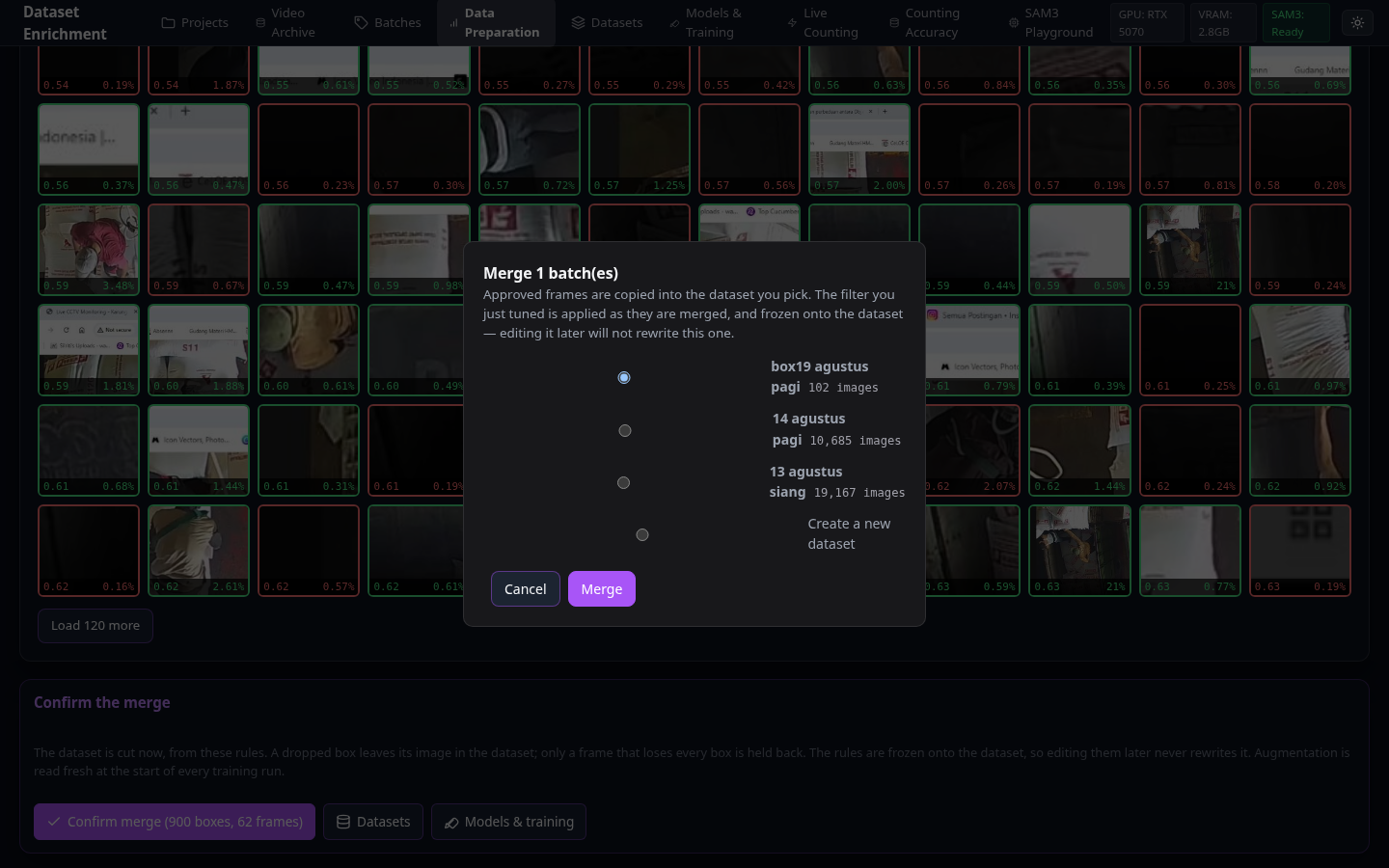
Merge Target and Dataset Freeze Modal

Figure 4.5: Dataset Freeze dialog enforcing deterministic SHA-1 Stable Val Split rules.

| Attribute | Specification | |---|---| | **๐ŸŽฏ Purpose** | Apply synthetic vision augmentations and freeze the curated batch into an immutable, versioned training dataset. | | **โšก Key Capabilities** | HSV shift, brightness/contrast, rotation, blur, and mosaic controls; dataset destination selection; split ratio slider. | | **๐Ÿ’ก Invariant** | **Stable Validation Split**: Validation assignment is derived deterministically from the frame's SHA-1 hash. Once a frame lands in `val`, it remains in `val` forever across all future versions. |
--- ### Phase 5: YOLO Retraining & Live Training Progress
5.1 Dataset Repository & YOLO Fine-Tuning โ€” Hardware-aware parameter tuning
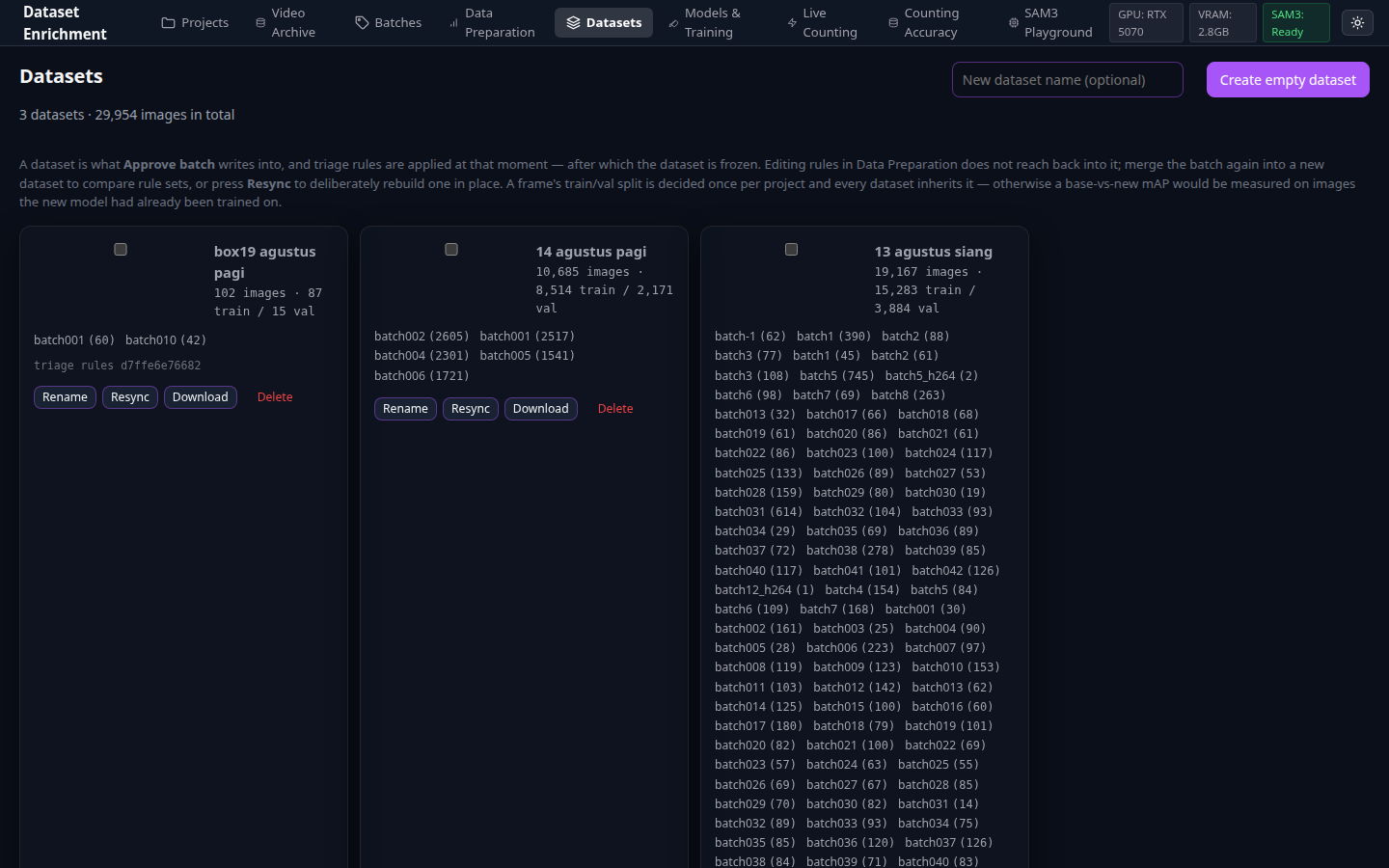
Master Datasets List

Figure 5.1: Master Dataset repository showing version history, train/val splits, and export tools.


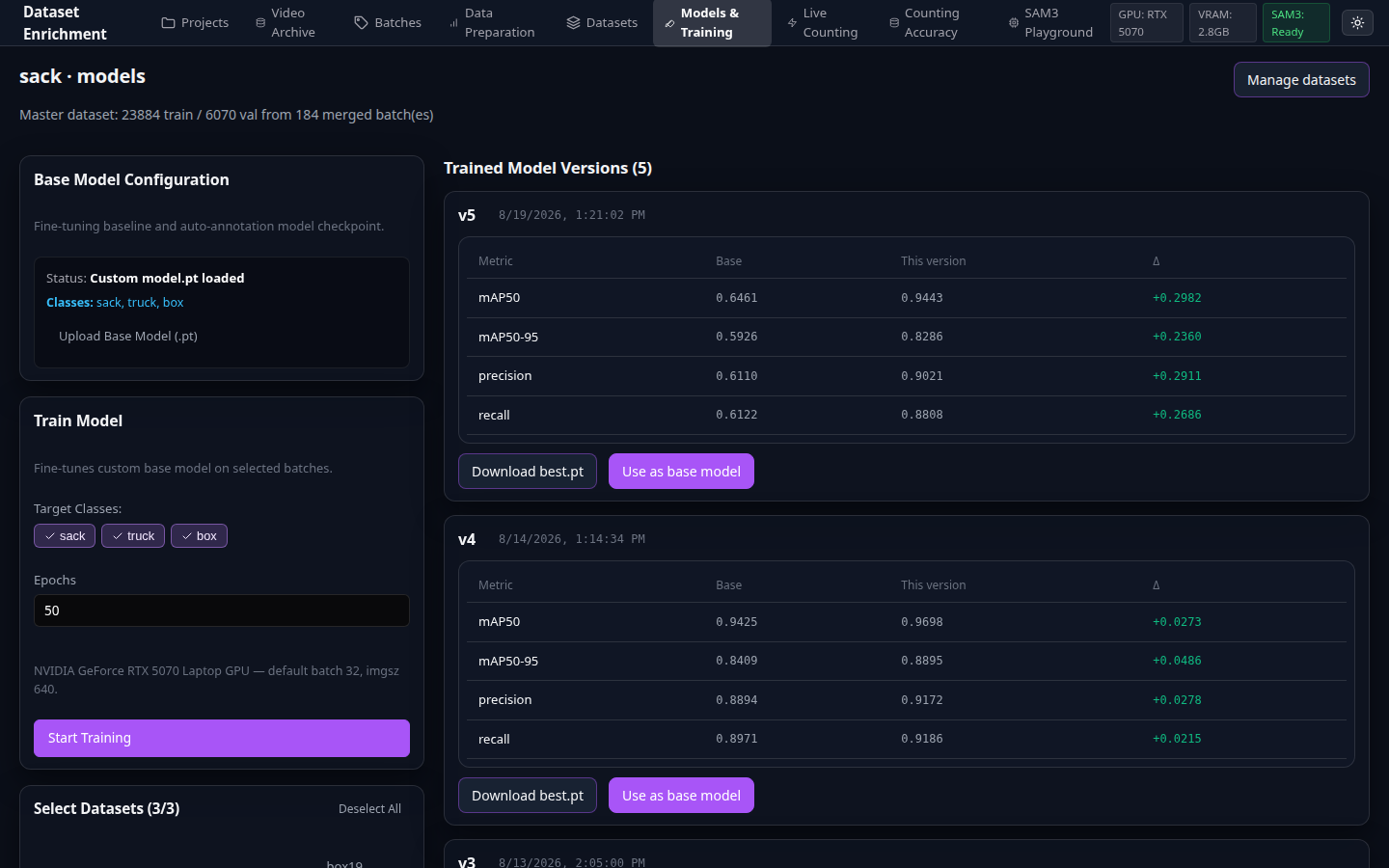
YOLO Models and Training Page

Figure 5.2: YOLO fine-tuning parameter setup with hardware detection and model history.


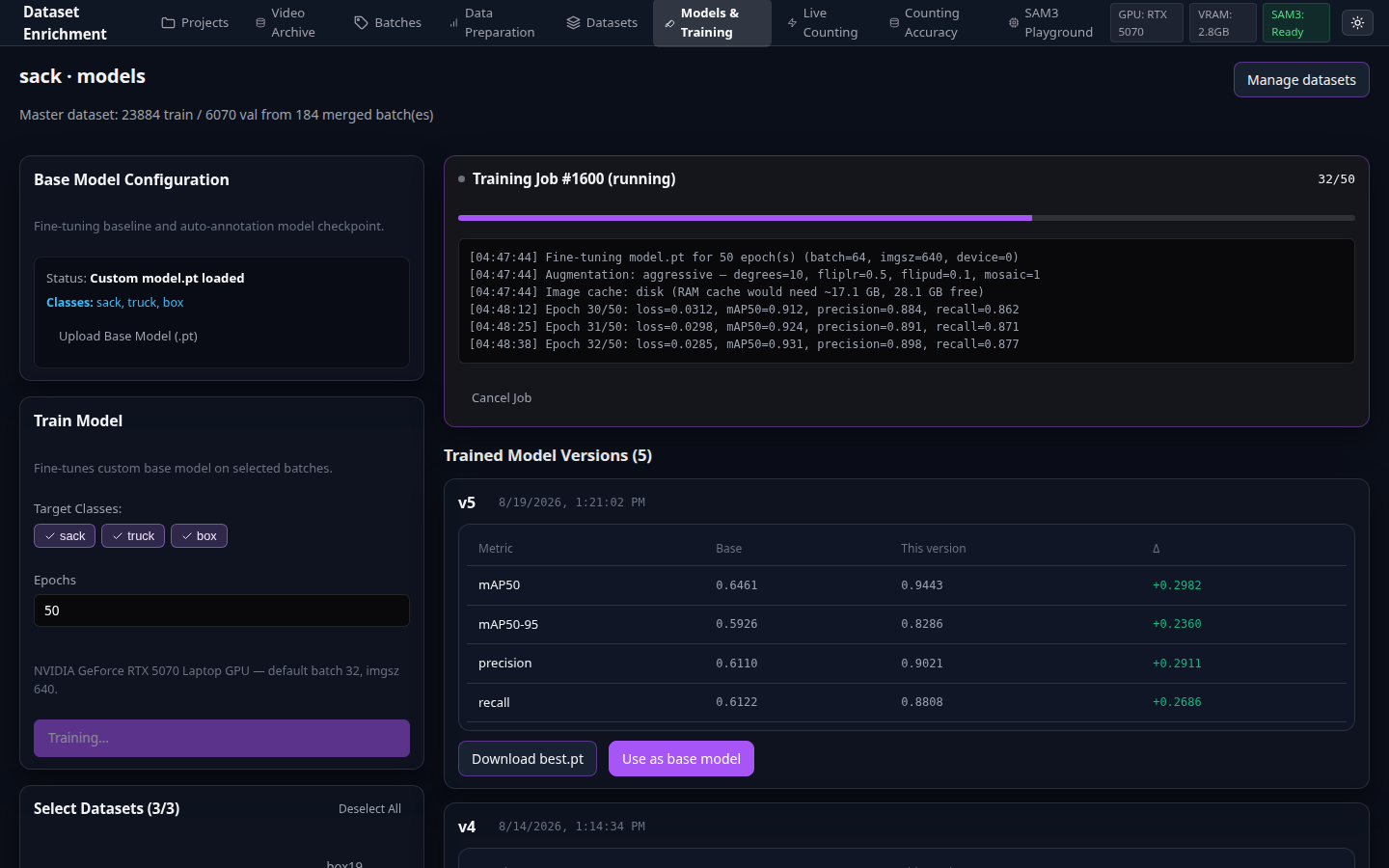
Live Training Workflow Progress

Figure 5.3: Real-time training telemetry with live loss curves, mAP metrics, and stdout logs.

| Attribute | Specification | |---|---| | **๐ŸŽฏ Purpose** | Train Ultralytics YOLO11 object detection models with automated hardware tuning and live telemetry. | | **โšก Key Capabilities** | Architecture selection (`YOLO11n/s/m/l/x`), auto-calculated batch sizes based on free GPU VRAM, real-time loss sparklines (`box_loss`, `cls_loss`, `dfl_loss`), epoch progress bars, and streaming logs. | | **๐Ÿ’ก Invariant** | **Side-by-side Validation**: After training, both the base model and fine-tuned model are benchmarked on the identical validation set, displaying signed metric deltas ($\Delta\text{mAP50}$, $\Delta\text{precision}$, $\Delta\text{recall}$). |
--- ### Phase 6: Counting Accuracy Benchmark & Live Production Inference
6.1 Counting Benchmark Matrix & Live Line Counter โ€” 146 FPS verification
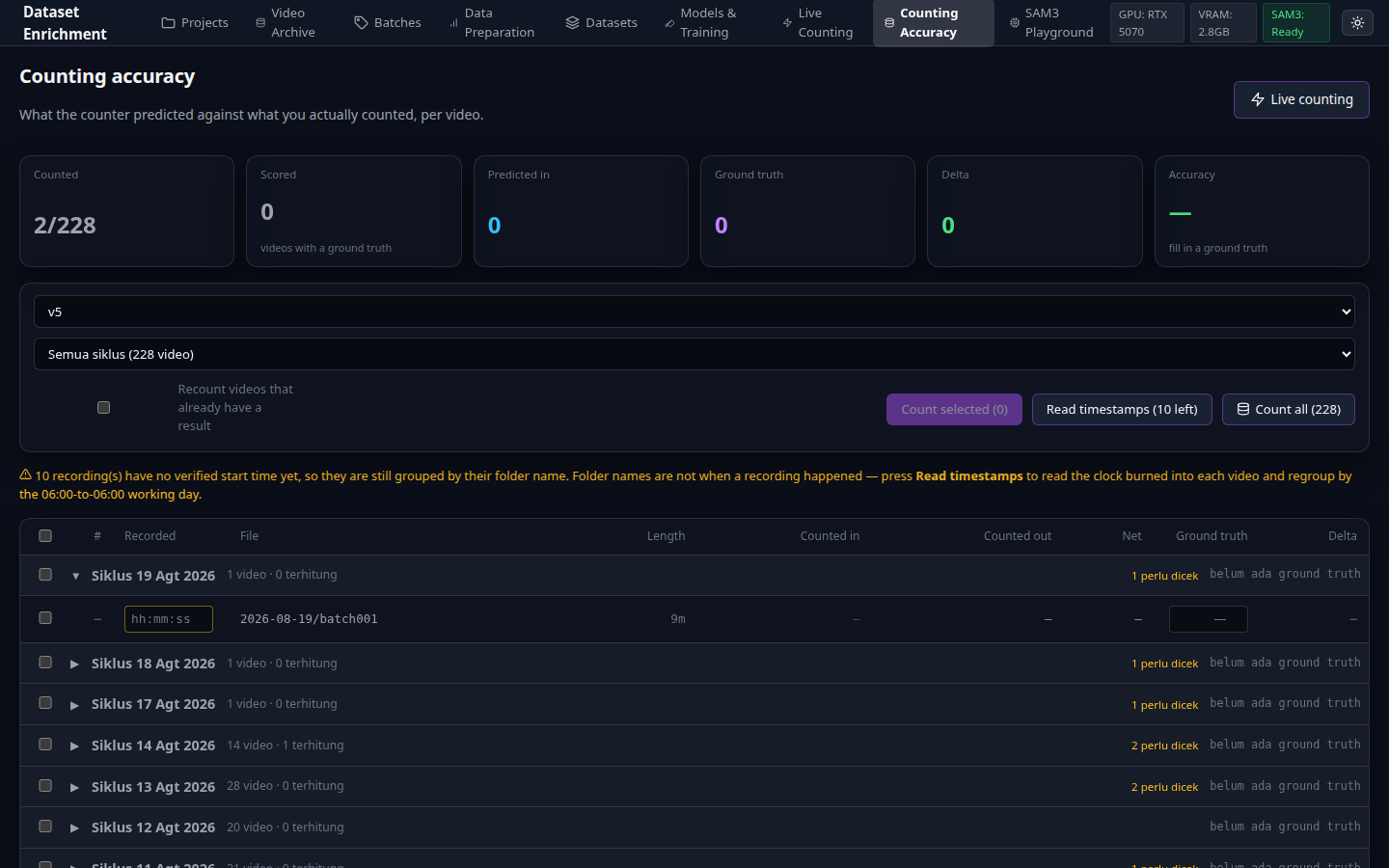
Counting Accuracy Benchmark Matrix

Figure 6.1: Counting Accuracy Benchmark Matrix comparing multi-model predictions against Ground Truth.


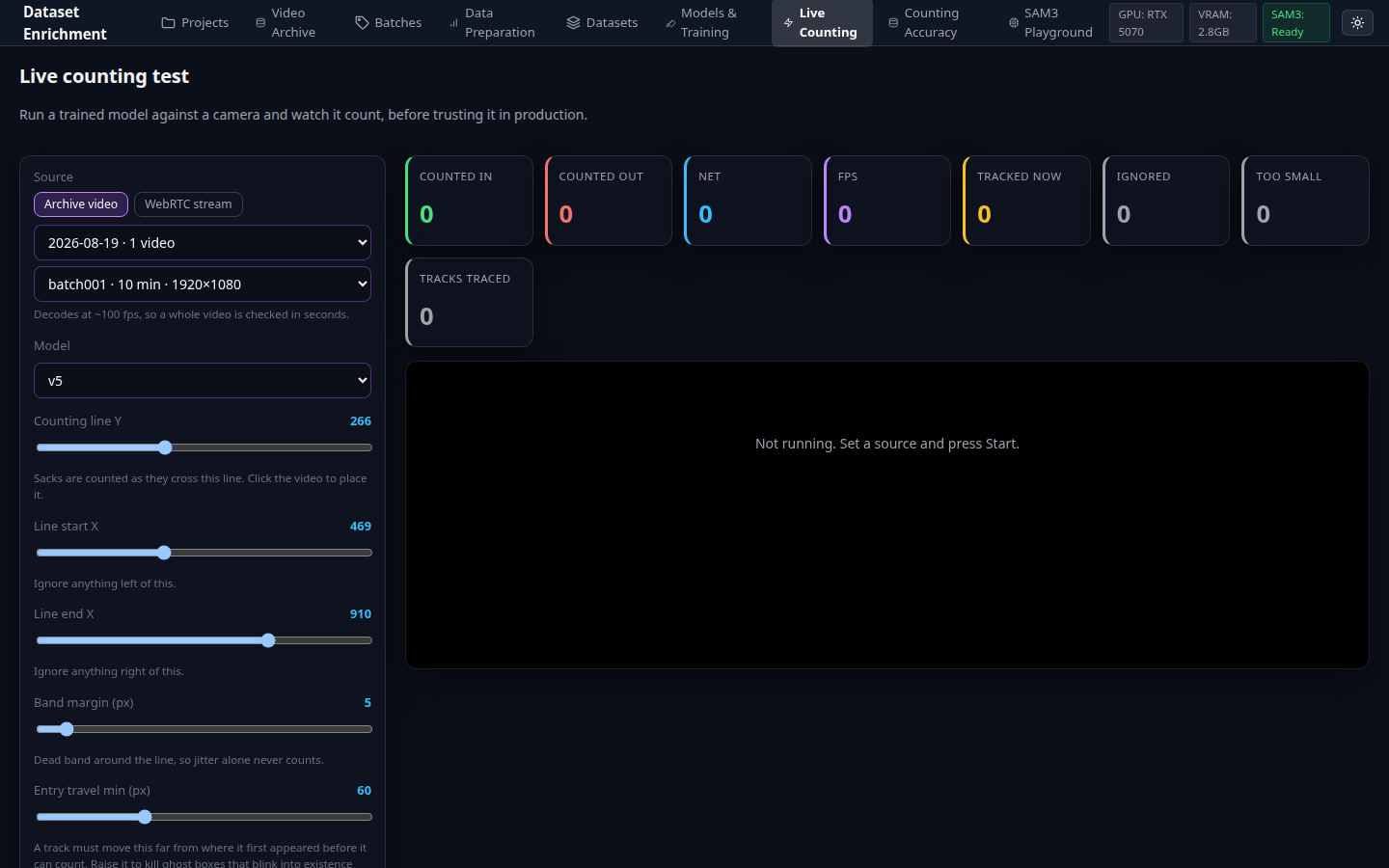
Live Video Inference and Line Counter

Figure 6.2: Real-time CCTV live counting interface with interactive tripwire line and ByteTrack trails.

| Attribute | Specification | |---|---| | **๐ŸŽฏ Purpose** | Verify model counting precision against physical ground truth records and run real-time production counting. | | **โšก Key Capabilities** | Headless counting benchmark running at **146 FPS**, signed delta badges (`+2`, `-1`, `0`), draggable tripwire counting line, ByteTrack trajectory tracking, and per-track JSONL diagnostic logs. | | **๐Ÿ’ก Invariant** | **Counting tripwire on upper edge ($y_1$)**: Tripwire evaluates the top edge coordinate of the sack bounding box rather than the center or bottom, preventing miscounts caused by physical sack deformation as it drops onto the conveyor. |
--- ## ๐ŸŽฅ Production Counting Engine The counting engine is designed for industrial conveyor belts with low or unstable camera frame rates. It eliminates reliance on instantaneous line-crossing frames by evaluating historical bounding box trajectories. ```mermaid stateDiagram-v2 [*] --> UNKNOWN UNKNOWN --> ABOVE: y1 coordinate above counting band UNKNOWN --> BELOW: Born below band (ghost detection โ€” rejected) ABOVE --> COUNTED: Trajectory crosses band + travelled entry_travel_min COUNTED --> ABOVE: Sustained frames above line (genuine reload) ``` ### Multi-Layer Counter Safeguards | Guard Layer | Rule Specification | Failure Mode Prevented | |---|---|---| | **Layer 1: Entry Origin Guard** | Object must be observed **above** the counting band prior to crossing. | Prevents counting items that spawn directly inside the truck or loading chute. | | **Layer 2: Trajectory Distance** | Object must travel a minimum distance (`entry_travel_min`) across consecutive frames. | Discards transient noise and flickering phantom boxes. | | **Layer 3: Track Hand-Off** | When a track is occluded, its movement history is parked for newborn tracks within `handoff_radius`. | Prevents tracker ID switches from dropping or duplicating counts. | | **Layer 4: Directional Monotonicity** | Strict single count per trajectory direction with verdict locked to the final confirmed motion. | Prevents double-counting during momentary conveyor pauses. | --- ## โš™๏ธ Configuration & Environment Matrix All configuration parameters are defined via environment variables in `.env`: | Variable | Type | Default Value | Scope | Description | |---|---|---|---|---| | `HF_TOKEN` | `String` | *(Required)* | Backend / Docker | HuggingFace user access token with authorized permissions to download gated `facebook/sam3` weights. | | `VIDEO_ARCHIVE_HOST` | `Path` | `./data/archive` | Docker Compose | Host filesystem directory path containing raw CCTV video recordings (structured as `/.mp4`). Relative paths resolve against the directory `./start.sh` runs from. Mounted read-write; written only by user-initiated upload / date-folder creation (REQ-178), nothing else. | | `APP_DATA_DIR` | `Path` | `./data` (or `/data` in Docker) | Backend | Base directory for application persistent data, SQLite database (`app.db`), projects, extracted frames, datasets, and model weights. | | `VIDEO_ARCHIVE` | `Path` | `/videos` (or `data/archive`) | Backend | Internal container/local filesystem path where the video archive is browsed by FastAPI. | | `WEB_PORT` | `Integer` | `9000` | Docker / Nginx | Host HTTP port mapped to the Nginx frontend web UI. | | `API_PORT` | `Integer` | `9010` | Docker / FastAPI | Host HTTP port mapped to the FastAPI backend API. | | `CORS_ORIGINS` | `String` | `http://localhost:5173,http://localhost:9000,http://localhost:9010` | FastAPI Backend | Comma-separated list of allowed origins for Cross-Origin Resource Sharing. | | `API_URL` | `URL` | `http://localhost:8000` | Vite Dev Server | Backend target endpoint for Vite development proxy (`frontend/vite.config.js`). | | `MEDIAMTX_WHEP_PATH` | `String` | `/whep` | Backend Live Count | WHEP WebRTC endpoint path on the streaming media server (MediaMTX). | | `MEDIAMTX_RTSP_PORT` | `Integer` | `8554` | Backend Live Count | RTSP stream port used to translate WHEP browser streams into backend video processing feeds. | | `RTSP_TRANSPORT` | `String` | `tcp` | Backend Live Count | RTSP transport protocol (`tcp` or `udp`). TCP guarantees zero frame drop on industrial networks. | | `PLAYBACK_URL` | `URL` | `http://192.168.192.96:9996/get` | Recorder Service | MediaMTX recording playback API endpoint for automated CCTV session extraction. | | `PLAYBACK_PATH` | `String` | `cam` | Recorder Service | Stream channel identifier on the MediaMTX playback server. | | `AUTO_PULL_INTERVAL` | `Integer` | `30` | Auto-Pull Script | Polling frequency in seconds for automated Git repository synchronization (`scripts/auto_pull.py`). | | `WEBHOOK_PORT` | `Integer` | `9000` | Webhook Daemon | Port for the GitHub push webhook listener daemon (`scripts/webhook.py`). | | `WEBHOOK_SECRET` | `String` | `""` | Webhook Daemon | Shared secret key for validating GitHub webhook HMAC-SHA256 signatures. | --- ## ๐Ÿ—‚๏ธ Persistent Data & Storage Layout All application state, relational metadata, and trained weights live in `data/`: ``` data/ โ”œโ”€โ”€ app.db # SQLite metadata database with Write-Ahead Logging (WAL) โ”œโ”€โ”€ archive//batchNNN.mp4 # Raw CCTV video recordings (Mounted strictly read-only) โ”‚ batchNNN.json # Sidecar metadata with true server timestamp โ”œโ”€โ”€ recorder.log # 24/7 background recorder daemon log โ”œโ”€โ”€ live-count/session-*.jsonl # Diagnostic per-track trajectory and crossing logs โ””โ”€โ”€ projects// # Isolated project workspace โ”œโ”€โ”€ base/model.pt # Project base model weights and locked class taxonomy โ”œโ”€โ”€ batches//frames/ # Losslessly extracted image frames from video slices โ”œโ”€โ”€ datasets// # Frozen Ultralytics YOLO formatted training datasets โ”‚ โ”œโ”€โ”€ images/{train,val}/ # Immutable frame images โ”‚ โ””โ”€โ”€ labels/{train,val}/ # YOLO format bounding box annotations (.txt) โ””โ”€โ”€ models// # Training runs (weights/best.pt, metrics.json, args.yaml) # Named: {arch}-{labelType}-{epochs}ep-{classNames}-{date} ``` --- ## โš™๏ธ Background Job Worker & Mutex Locking Heavy computational operations run through an asynchronous background worker (`backend/jobs.py`) with strict GPU mutex locking to prevent VRAM over-allocation: | Job Type | GPU Locked | Description | |---|:---:|---| | `extract` | โ€” | Background FFmpeg extraction of video ranges into frame sequences. | | `autolabel` | โœ… | Meta SAM3 zero-shot grounding across candidate frames (one `set_image` per image). | | `merge` | โ€” | Compiles reviewed batches into immutable dataset splits under frozen triage rules. | | `train` | โœ… | Ultralytics YOLO11 fine-tuning followed by automated dual-model validation. | | `count` | โœ… | Headless evaluation benchmark running archive videos at **146 FPS**. | | `clock-scan` | โ€” | OCR extraction of camera burned-in timestamps. | | `truck-scan` | โœ… | Batch inference check verifying the presence of target industrial objects. | --- ## ๐Ÿ“Š Metrics Integrity & Domain Invariants 1. **Stable Validation Split**: Validation assignment is determined deterministically by `sha1(image_bytes) % 100 < val_ratio`. Once a frame lands in the validation split, it remains in validation across all future dataset iterations. This prevents validation leak and ensures that rising mAP scores reflect genuine model improvements. 2. **One `set_image` per Frame**: SAM3 executes its heavy vision transformer backbone once per image. Multi-class text prompting evaluates the lightweight grounding head against cached backbone embeddings. 3. **Outlier Filtering Preserves Frames**: Dropping a bounding box during Data Prep removes only the bad annotation. The image frame remains in the dataset as long as at least one valid box persists. 4. **Upper-Edge Coordinate Line Crossing ($y_1$)**: Tripwires evaluate the top edge coordinate of bounding boxes ($y_1$) rather than the centroid ($y_c$) or bottom edge ($y_2$), ensuring immunity to sack deformation upon conveyor impact. --- ## ๐Ÿ“š Documentation & Deep Dives Comprehensive technical specifications, operational SOPs, and architecture diagrams are available in the [`docs/`](docs/) directory: | Document | Format | Description | Action | |---|:---:|---|:---:| | **Panduan Sistem Lengkap (Handover)** | `PDF` (11 MB) | **Publication-Grade Master User Guide & Technical Manual** (Indonesian) with complete operational SOPs and embedded figures. | [**โฌ‡๏ธ Download PDF**](docs/PANDUAN_SISTEM_LENGKAP.pdf) | | **Panduan Sistem Lengkap Source** | `FODT` (11.8 MB) | Native LibreOffice Writer Flat XML editable source document. | [**โฌ‡๏ธ Download FODT**](docs/PANDUAN_SISTEM_LENGKAP.fodt) | | **Panduan Sistem Lengkap Markdown** | `MD` (68 KB) | Full Markdown transcript of the 14-chapter system manual. | [**๐Ÿ“– View MD**](docs/PANDUAN_SISTEM_LENGKAP.md) | | **Architecture Flow Diagram (4K)** | `PNG` (1.5 MB) | 4K Ultra-HD raster export of the 8-stage end-to-end retraining pipeline. | [**โฌ‡๏ธ Download 4K**](docs/diagram-alur.png) | | **Architecture Flow Diagram (Vector)** | `SVG` (34.6 KB) | Scalable vector graphic diagram for high-resolution display. | [**โฌ‡๏ธ Download SVG**](docs/diagram-alur.svg) | | **Architecture Flow Diagram (Source)** | `FODG` (24.8 KB) | Native LibreOffice Draw Flat XML editable source file. | [**โฌ‡๏ธ Download FODG**](docs/diagram-alur.fodg) | | **Entity Relationship Diagram (ERD)** | `MD` (8.5 KB) | Relational database schema, foreign keys, indexes, and Mermaid ERD diagram. | [**๐Ÿ“– View ERD**](ERD.md) | | **System Requirements Specification** | `MD` (23.6 KB) | Numbered technical requirements (`REQ-001` through `REQ-042`). | [**๐Ÿ“– View Spec**](docs/requirements.md) | | **System Design & Architecture** | `MD` (22.7 KB) | Database schema, REST API contracts, disk layouts, and backend invariants. | [**๐Ÿ“– View Design**](docs/design.md) | | **UI/UX Design Specification** | `MD` (79.7 KB) | Dark theme design tokens, hotkey maps, and component specifications. | [**๐Ÿ“– View UI Spec**](docs/ui-spec.md) | | **Ground Truth Benchmark Dataset** | `XLSX` (586 KB) | Hand-verified physical conveyor bag counts across operational shifts. | [**โฌ‡๏ธ Download XLSX**](docs/GT.xlsx) | --- ## ๐Ÿ”ง Troubleshooting & FAQ
Deployment & GPU Acceleration
| Symptom | Root Cause & Remediation | |---|---| | `could not select device driver` | NVIDIA Container Toolkit is missing or Docker Engine is older than CDI specifications. Run `./install_nvidia.sh` or update Docker. | | `CUDA out of memory` during training | Lower the batch size on the Models page or stop background jobs. SAM3 releases VRAM before training starts, but external processes may hold memory. | | Changes to frontend or backend do not appear | Docker Compose caches container layers at build time. Run `docker compose build backend frontend` and hard-refresh your browser (`Ctrl+Shift+R`). | | Job shows *interrupted by server restart* | The backend process stopped while a job was active. Jobs do not resume mid-epoch; simply re-trigger the job from the UI. |
SAM3 Foundation Auto-Annotation
| Symptom | Root Cause & Remediation | |---|---| | Job fails at *Loading Model* with HTTP 401 | HuggingFace token is invalid or access to [facebook/sam3](https://huggingface.co/facebook/sam3) has not yet been approved. | | SAM3 checkpoint download is slow | HuggingFace Xet transfer throttling. `HF_HUB_DISABLE_XET=1` is enabled by default in `docker-compose.yml` to bypass this issue. | | SAM3 generates inaccurate bounding boxes | Refine the natural language prompt with physical descriptors (e.g. `"woven polypropylene sack with blue logo"`) or add visual crops to the Exemplar Pool. |
Video Archive & Live Counting
| Symptom | Root Cause & Remediation | |---|---| | Video file marked as *unreadable* | FFmpeg/FFprobe could not parse the video header. Run `uv run python scripts/transcode_archive.py` to re-mux into standard H.264 MP4. | | Shift cycle shows fewer recordings than expected | Check if recordings crossed the 06:00 boundary. Clips recorded before 06:00 belong to the previous operational shift cycle. | | Live Counting shows *GPU busy* | An active fine-tuning or auto-annotation job holds the GPU lock. The live counter waits 30 seconds before falling back to CPU or queuing. |
--- ## ๐Ÿค Contributing & Engineering Guidelines Development adheres strictly to the **Chain of Truth** methodology: - **Specifications First**: Every feature must map directly to a numbered requirement in [`docs/requirements.md`](docs/requirements.md) and architectural design in [`docs/design.md`](docs/design.md). - **Verified Deliverables**: Tasks tracked in [`docs/tasks.md`](docs/tasks.md) flip to `[DONE]` only after concrete end-to-end verification. - **Surgical Changes**: Touch only code directly relevant to the feature. Adhere to the working rules in [`AGENTS.md`](AGENTS.md). - **Package Manager**: All backend dependencies are managed exclusively with Astral `uv` (`requirements.txt`). --- ## ๐Ÿ“„ License Distributed under the MIT License. See [`LICENSE`](LICENSE) for details.